
 Honda Accord: Rear Seat Side Bolster Cover
Replacement
Honda Accord: Rear Seat Side Bolster Cover
Replacement
4-door
NOTE: Take care not to tear or damage the seat covers.
1. Remove the seat side bolster (see page 20-242).
2. Release all the hook strips (A), fold back the seat side bolster cover (B), and release the cover from the retaining hooks (C).
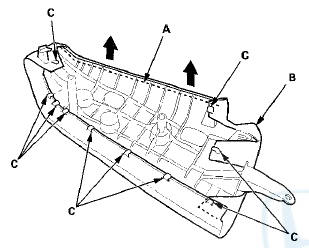
3. Install the bolster cover in the reverse order of removal. To prevent wrinkles when installing a side bolster cover, make sure the material is stretched evenly over the pad before securing the hook strips and the retaining hooks.
 Rear Seat-back Cover Replacement
2-door
NOTE:
- Put on gloves to protect your hands.
- Take care not to tear or damage the seat covers.
1. Remove the seat-back (see page 20-239).
2. Remove all of the head restraints.
3. ...
 Rear Seat Cushion Cover
Replacement
Rear Seat Cushion Cover
Replacement
NOTE:
-Put on gloves to protect your hands.
- Take care not to tear or damage the seat covers.
1. Remove the seat cushion (see page 20-241).
2. From the back of the seat-back, release all th ...
See also:
Fuel Economy
Actual Mileage and EPA Fuel
Economy Estimates Comparison.
Fuel economy is not a fixed number.
It varies based on driving conditions,
driving habits, and vehicle condition.
Therefore, it is not ...
Crossover Network Control Unit
Removal/Installation
Driver's Door Speaker Crossover Network
Control Unit
1. Remove the driver's dashboard lower cover (see page
20-166).
2. Disconnect the connector (A), then remove the
driver's door speaker cross ...
A/C Compressor Clutch Circuit
Troubleshooting
NOTE:
• It is normal for the A/C compressor to turn off under
certain conditions, such as low idle, high engine
coolant temperature, hard acceleration, or high/low
refrigerant pressure.
в ...