
 Honda Accord: WiperA/Vasher Switch
Test / Replacemen
Honda Accord: WiperA/Vasher Switch
Test / Replacemen
1. Remove the steering column covers {see page 20-181).
2. Disconnect the dashboard wire harness 8P connector (A) from the wiper/washer switch (B).
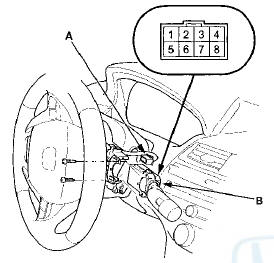
3. Remove the two screws, then slide out the wiper/washer switch.
4. Inspect the connector terminals to be sure they are all making good contact.
• If the terminals are bent, loose or corroded, repair them as necessary, and recheck the system.
• If the terminals look OK, go to step 5.
5. Check for continuity between the terminals in each switch position according to the table.
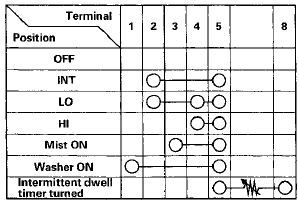
6. If the continuity is not as specified, replace the switch.
7. Install the switch in the reverse order of removal.
 MICU Input Test
NOTE; Before testing, troubleshoot the multiplex integrated control unit
first, using B-CAN System Diagnosis Test Mode A (see page 22-134).
Drivers MICU
1. Turn the ignition switch to LOCK (0), an ...
 Wiper Motor Test
4-door
1. Remove the driver's side wiper arm (see page
22-321).
2. Remove the left side cowl cover (see page 22-321).
3. Disconnect 5P connector (A) from the windshield
wiper motor (B).
4. ...
See also:
Console Accessory Power Socket
Test/Replacement
NOTE: If all of the front and console accessory power
sockets do not work, check the No. 1 8 (7.5 A) fuse in the
driver's under-dash fuse/relay box and ground (G503)
first.
1. Remove the center ...
ODS Unit Initialization
NOTE:
• After SRS unit or ODS unit is replaced, do this
procedure to initialize the ODS unit.
• ODS unit initialization will initialize both OPDS sensor
and front passenger's weight se ...
Forward Collision Warning (FCW)*
Alerts you when it detects the possibility of your vehicle colliding with the
vehicle in
front of yours.
If the system determines a collision is possible, it gives both visual and
audible alert ...