
 Honda Accord: Front Impact Sensor Replacement
Removal
1. Do t h e battery t e r m i n a l d i s c o n n e c t i o n procedure (see page 22-91), t h e n w a i t at least 3 m i n u t e s before s t a r t i ng work.
2. Remove t h e f r o n t b u m p e r (see page 20-255).
3. Left side: remove t h e intake air resonator (see page 11-333).
4. Disconnect t h e left or r i g h t engine c o m p a r t m e n t w i re harness 2P connector (A) f r o m t h e f r o n t impact sensor (B).
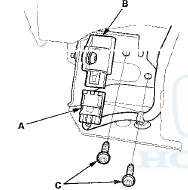
5. Remove t h e TORX bolt (C) u s i n g a TORX T30 bit, t h en remove t h e f r o n t impact sensor.
Installation
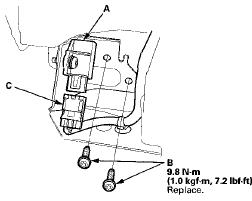
1. Install t h e f r o n t impact sensor (A) w i t h n e w TORX bolts (B), u s i n g a TORX T30 bit. Connect t h e left or right engine c o m p a r t m e n t w i r e harness 2P connector (C) t o t h e f r o n t impact sensor.
2. Do t h e battery t e r m i n a l reconnection procedure (see page 22-91).
3. Clear any DTCs w i t h t h e HDS (see page 24-38).
4. C o n f i rm proper SRS o p e r a t i o n : T u r n t h e i g n i t i on switch t o ON (II); t h e SRS indicator s h o u l d c o m e on f o r about 6 seconds and t h e n g o off.
5. Reinstall all r e m o v e d parts.
 ODS Unit Replacement
Removal
1. Do t h e battery t e r m i n a l disconnection procedure (see
page 22-91), t h e n w a i t at least 3 minutes before
s t a r t i ng work.
2. Remove t h e f r o n t passenger's seat (s ...
 Driver's Seat Position Sensor Replacement
Removal (Power seat)
NOTE: Do not t u r n t h e i g n i t i o n s w i t c h t o ON (II), a n d do
not connect t h e battery cable w h i l e r e m o v i n g t he
d r i v e r ' s seat p o s i t i o n ...
See also:
Passenger's Airbag Cutoff Indicator Replacement
1. With navigation: Remove the dashboard center vent
(see page 20-178).
2. Without navigation: Remove the audio unit (see page
23-114).
3. Disconnect the 6P connector (A) from the passenger's
...
Maintenance Main Items and Sub Items
All maintenance items displayed on
the information display are in code.
For an explanation of these
maintenance codes. ...
Operating the XM Radio
To listen to XM Radio, turn the
ignition switch to the ACCESSORY
(I) or ON (II) position, and press the
button. The
last channel you
listened to will show in the display.
Adjust the volume ...