
 Honda Accord: Drain Channel Replacement
1. Remove the moonroof glass (see page 20-91).
2. On both sides, slide the glass brackets (A) with the moonroof switch to the position where the moonroof normally tilts up and disconnect the drain channel rods (B).
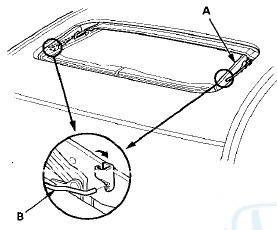
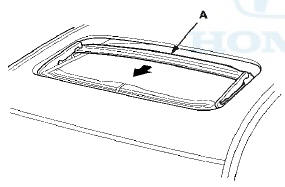
3. Slide the drain channel (A) forward.
4. Pull up the rear edge of the drain channel (A) while pushing both clips (B), and release the channel from both hooks (C) of the drain channel slider by pulling it rearward.
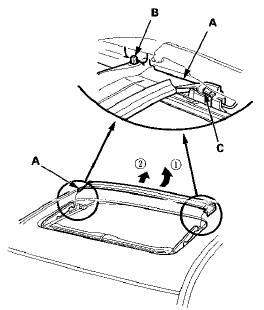
5. Remove the drain channel.
6. Install the channel in the reverse order of removal, and note these items: - Push the clip areas into place securely.
- Check the glass position adjustment (see page 20-91).
7. Check for water leaks (see step 9 on page 20-57). Let the water run freely from a hose without a nozzle. Do not use a high-pressure spray.
 Wind Deflector Replacement
NOTE: When prying with a flat-tip screwdriver, wrap it
with protective tape to prevent damage.
1. Open the glass fully.
2. Remove the deflector links (A) from both sides.
3. Remove the wind ...
 Sunshade Replacement
1. Remove the drain channel (see page 20-94).
2. Slide the sunshade (A) until you can see both
sunshade slider spacers (B).
3. Remove the screws, then remove both sunshade
slider spacers.
4. ...
See also:
Dashboard/Steering Hanger Beam
Removal/Installation
Special Tools Required
KTC Trim Tool Set SOJATP2014*
*Available through the Honda Tool and Equipment
Program; call 888-424-6857
SRS components are located in this area. Review the
SRS component l ...
HFL Switch Removal/Installation
1. Remove the steering wheel (see page 17-6).
2. Remove the HFL switch (see page 17-7).
3. Install the HFL switch in the reverse order of removal. ...