
 Honda Accord: Front Fender Trim Replacement
2-door
NOTE: - Take care not to scratch the front grille cover or the body.
- When prying with a flat-tip screwdriver, wrap it with protective tape to prevent damage.
- The left side is shown; the right side is similar.
1. Remove the front fender trim (A).
-1. Detach the clip (B) from the front grille cover (C).
-2. Detach the clips (D) securing the trim.
-3. Pull up the trim to release the projections (E) from the holes in the body, and pull out the trim from under the front grille cover.
NOTE: To release the clip B, pry up on the center pin at the notch (F).
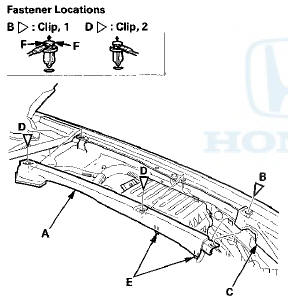
2. Install the trim in the reverse order of removal, and note these items: - If the clips are damaged or stress-whitened, replace them with new ones.
- Push the clips into place securely.
4-door
NOTE: - Take care not to scratch the front grille cover or the body.
- When prying with a flat-tip screwdriver, wrap it with protective tape to prevent damage.
- The left side is shown; the right side is similar.
1 Remove the front fender trim (A).
-1. Detach the clips (B, C) from the front grille cover (D).
-2. Detach the clips (E) securing the trim.
-3. Pull up the front grille cover to release the hook (F) from the front fender cover.
-4. Pull up the trim to release the projections (G) from the holes in the body.
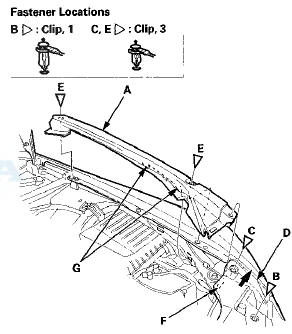
2. Install the trim in the reverse order of removal, and note these items: - If the clips are damaged or stress-whitened, replace them with new ones.
- Push the clips and the hook into place securely.
 Front Grille Replacement
Special Tools Required
KTC Trim Tool Set SOJATP2014*
* Available through the Honda Tool and
Equipment
Program; call 888-424-6857
Grille Replacement - 2-door
NOTE:
- Take care not to scratch th ...
 Cowl Cover Replacement
Special Tools Required
KTC Trim Tool Set SOJATP2014*
*Available through the Honda Tool and
Equipment
Program; call 888-424-6857
Cowl Cover Replacement
NOTE:
- Put on gloves to protect your han ...
See also:
Towing
If the vehicle needs to be towed, call a professional
towing service. Never tow the vehicle behind another
vehicle with just a rope or chain It is very dangerous.
Emergency Towing
There are three ...
Remote Transmitter
LOCK - Press this button once to
lock both doors. Some exterior lights
will flash once. When you push
LOCK twice within 5 seconds, you
will hear a beep to verify that the
doors are locked ...
Checking Loads
The best way to confirmthat all
loads are within limits is to check
them at a public scale. For public
scales in your area, check your local
phone book, or contact your trailer
dealer or ren ...