
 Honda Accord: XM Receiver Removal/Installation
Eighth generation (2008–2012) / Honda Accord MK8 2008-2012 Service Manual / Audio, Navigation, and Telematics / Audio System / XM Receiver Removal/Installation
1. Open the trunk lid, and remove the right trunk side trim panel {see page 20-132).
2. Disconnect the connectors (A) from the XM receiver (B).
4-Door
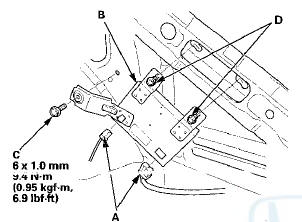
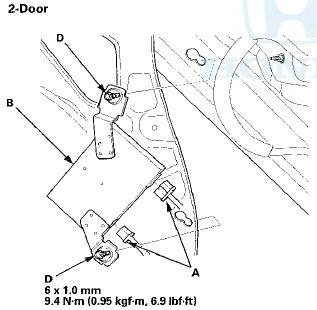
3. Remove the mounting bolt (C) and loosen the mounting bolts (D), then remove the XM receiver.
4. Install the XM receiver in the reverse order of removal.
 Stereo Amplifier
Removal/Installation
Stereo Amplifier
Removal/Installation
With Premium Audio System
1. Remove the glove box (see page 20-174).
2. Disconnect the connectors (A).
3. Remove the bolt (B) and loosen the bolts (C) securing
the stereo amplifier (D).
4. ...
 Active Noise Cancellation
Microphone
Removal/Installation
Active Noise Cancellation
Microphone
Removal/Installation
Front
1. Remove the roof console (see page 20-140), and
disconnect the connector (A) from the front active
noise cancellation microphone (B).
2. Remove the screws and the front active noise
can ...
See also:
The Passenger’s Front Airbag Can Pose Serious Risks
Front airbags have been designed to
help protect adults in a moderate to
severe frontal collision. To do this,
the passenger’s front airbag is quite
large, and it can inflate with enough
f ...
Playing the FM/AM Radio (Models without navigation system)
Playing the FM/AM Radio (Models without navigation system) ...