
 Honda Accord: Washer Reservoir Replacement
1. Remove the right inner fender (see page 20-290).
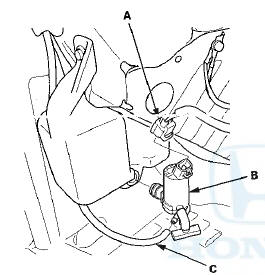
2. Disconnect the 2P connector(s) (A) from the washer motor (B) and the washer fluid level switch (Canada models).
Washer Reservoir Capacity:
2.5 L (2.64 US qt): USA models
4.5 L (4.75 US qt): Canada models
USA models
Canada models
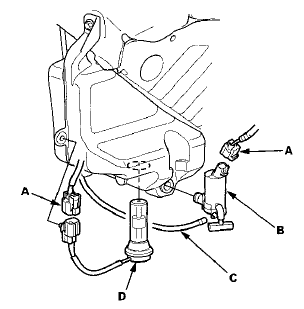
3. Disconnect the washer tube (C), then if necessary, remove the washer motor and the washer fluid level switch (D) (Canada models).
NOTE: Fluid may flow out of the opening.
4. Remove the clip (A) and three bolts from the washer reservoir (B).
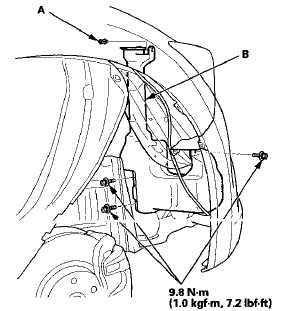
5. Install the washer reservoir in the reverse order of removal. Check the washer motor operation.
 Wiper Motor Replacement
Removal
1. Open the hood. Remove the caps (A) and nuts (B).
NOTE: The illustration shows 4-door.
2. Close the hood, then spread protective cloths (A) on
the hood to avoid scratching the hood e ...
 Wiper Blade Replacement
Removal
1. Lift the wiper arms off the windshield.
2. Pull up and hold the tab (A), and slide the wiper blade
assembly (B) toward the tabs until it releases from the
wiper arm (C).
NOTE: The ...
See also:
Gauges
Gauges include the speedometer, tachometer, fuel gauge, and related
indicators.
They are displayed when the ignition switch is in ON
• Speedometer
Displays your driving speed in mph (U.S.) ...
Replacing Rear Bulbs
1. Open the trunk.
Remove the screws in the center
of each of the two fasteners on the
side of the trunk lining. Pull the
lining back.
2. Determine which of the three
bulbs is burned out: ...
Combination Light Switch
Test/Replacement
1. Remove the driver's dashboard lower cover (see page 20-166).
2. Remove the steering column covers (see page 17-10).
3. Disconnect the 12P connector (A) from the combination light switch (B).
...