
 Honda Accord: VSA Off Switch Test
1. Turn the ignition switch to LOCK (0).
2. Remove the driver's dashboard lower cover {see page 20-166).
3. Push out the VSA OFF switch (A) from the driver's dashboard lower cover.
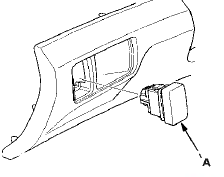
4. Check for continuity between the VSA OFF switch 5P connector terminals No. 1 and No. 2. There should be continuity when the button is pressed, and no continuity when the button is released.
VSA OFF SWITCH 5P CONNECTOR
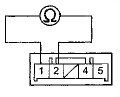
Terminal side of male terminals
5. Check for continuity between VSA OFF switch 5P connector terminals No. 4 and No. 5. There should be continuity at all times.
VSA OFF SWITCH 5P CONNECTOR
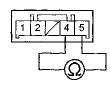
Terminal side of male terminals
6. Install the VSA OFF switch in the reverse order of removal.
 VSA Sensor Neutral Position Memorization
NOTE: Do not press the brake pedal during this
procedure.
1. Park the vehicle on a flat and level surface, with the
steering wheel in the straight ahead position.
2. With the ignition switch i ...
 VSA Modulator-Control Unit Update
Special Tools Required
- Honda diagnostic system (HDS) tablet tester
- Honda interface module (HIM) and an iN workstation
with the latest HDS software version
- HDS pocket tester
- GNA-600 and an ...
See also:
Ground Distribution
Ground to Components Index
* 1 : EX-L, EX-L PZEV
*2: Except EX-L, EX-L PZEV
*3: With premium audio system
*4: With navigation system
*5: '10 model
*6: '08-09 models ...
Fan Controls
Component Location Index
Symptom Troubleshooting Index
'08-09 models
10 model
Circuit Diagram
'08-09 models
'10 model
Radiator Fan Circuit Troubleshooting
'08-09 models
1 ...
A/T Clutch Pressure Control Solenoid
Valve B and C Replacement
1. Do the battery removal procedure (see page 22-92).
2. Remove the battery base (see step 8 on page 5-3).
3. Disconnect the A/T clutch pressure control solenoid
valves B and C connectors.
4 ...