
 Honda Accord: Starter Performance Test
1. Remove the starter (see page 4-11).
2. Firmly clamp the starter in a vise.
3. Make a connection for this test using the thickest (gauge) wire possible (preferably the same gauge as used on the vehicle).
NOTE: To avoid damaging the starter, never leave the battery connected for more than 5 seconds.
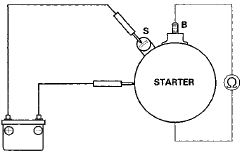
4. Connect the battery as shown, and check for continuity between the B terminal and the starter body. If there is continuity, it is working properly.
5. Disconnect the battery from the body, and check for continuity between the B terminal and the starter body. If there is no continuity, it is working properly.
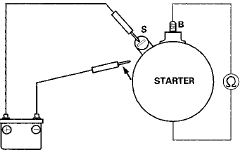
6. Connect the starter to the battery as shown, and confirm that the motor runs.
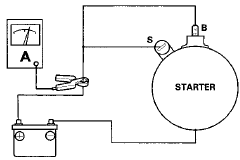
7. If the electric current meets the specification when the battery voltage is at 11.5 V, the starter is working properly.
Specification
Electric Current: 80 A or less
 Clutch Interlock Switch
Replacement
Clutch Interlock Switch
Replacement
M/T model
1, Disconnect the clutch interlock switch connector (A).
2. Loosen the locknut (B), then remove the clutch
interlock switch (C).
3. Install the clutch interlock switch, and adjust th ...
 Starter Removal and
Installation
Starter Removal and
Installation
Removal
1 Do the battery removal procedure (see page 22-92).
2. Remove the intake manifold (see page 9-4).
3. Disconnect the positive starter cable (A) from the B
terminal, and the S terminal ...
See also:
Gauge Control Module Input Test
NOTE: Before testing, do the gauge control module self-diagnosis function
(see page 22-332), and make sure the B-CAN
communication lines are OK.
1. Turn the ignition switch to LOCK (0).
2. Re ...
Front Seat Recline Motor Replacement
Driver's Seat (10-way Power Seat)
SRS components are located in this area. Review the
SRS component locations, 2-door (see page 24-23),
4-door (see page 24-21) and the precautions and
procedures ( ...
General Information
When using CD-R or CD-RW discs,
use only high quality discs labeled
for audio use.
When recording a CD-R or
CD-RW, the recording must be
closed for it to be used by the disc
changer.
Play ...