
 Honda Accord: Side Defogger Vent Trim
Removal/Installation
Honda Accord: Side Defogger Vent Trim
Removal/Installation
Special Tools Required
KTC Trim Tool Set SOJATP2014*
* Available through the Honda Tool and Equipment Program; call 888-424-6857
Driver's Side
NOTE: - Take care not to scratch the dashboard or the related parts.
- Use the appropriate tool from the KTC trim tool set to avoid damage when removing components.
1. Insert the appropriate trim tool into a gap between the side defogger vent trim (A) and the driver's outer middle pad (B), and detach the lower clips (C).
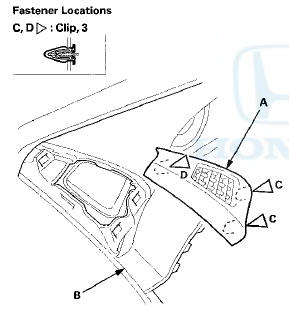
2. Pull out the side defogger vent trim to detach the upper clip (D), then remove the trim.
3. Install the vent trim in the reverse order of removal, and note these items: - If the clips are damaged or stress-whitened, replace them with new ones.
- Push the clips into place securely.
 Dashboard Center Vent
Removal / Installation
Dashboard Center Vent
Removal / Installation
Special Tools Required
KTC Trim Tool Set SOJATP2014*
*Available through the Honda Tool and Equipment
Program; call 888-424-6857
With Navigation Sf stem
NOTE:
- Take care not to scratch the dashb ...
 Driver's Outer Middle Pad
Removal/Installation
Driver's Outer Middle Pad
Removal/Installation
Special Tools Required
KTC Trim Tool Set SOJATP2014*
*Available through the Honda Tool and
Equipment
Program; call 888-424-6857
NOTE:
- Take care not to scratch the dashboard or the related
pa ...
See also:
DTC Troubleshooting Index
NOTE: The "x" at the end of each DTC denotes a numeric character (0 thru 9),
or items with an asterisk (*) (0, 2 thru 9),
or an alpha character (A thru F) that you will see on the HDS ...
Indicators
...
Tire Pressure Monitoring System (TPMS) -Required Federal Explanation
Each tire, including the spare (if provided), should be checked monthly when
cold and inflated to the inflation pressure recommended by the vehicle
manufacturer on the vehicle placard or tire infl ...