
 Honda Accord: Rocker Arm and Shaft Disassembly/Reassembly
NOTE: - Identify each part as it is removed so that each item can be reinstalled in its original locations, a Inspect the rocker arm shaft and rocker arms (see page 6-83).
- If reused, the rocker arms must be installed in the original locations.
- When removing, or installing the rocker arm assembly, do not remove the camshaft holder bolts. The bolts will keep the holders and rocker arms on the shaft.
- Prior to reassembling, clean all the parts in solvent, dry them, and apply new engine oil to any contact points.
- Bundle the rocker arms with rubber bands to keep them together as a set.
- When replacing the VTEC rocker arm assembly, remove the fastening hardware from the new VTEC rocker arm assembly.
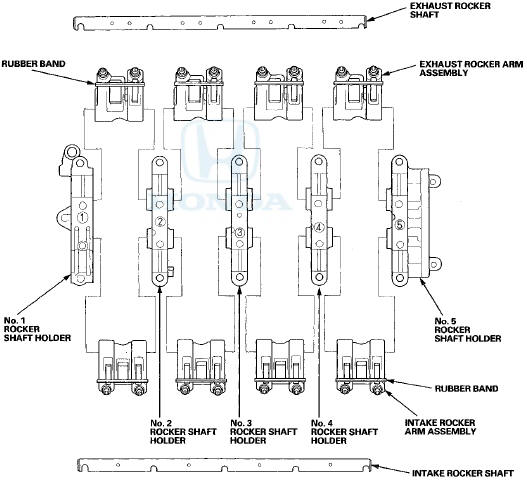
 Rocker Arm Assembly Removal
1 Remove the cam chain (see page 6-62).
2. Loosen the rocker arm adjusting screws (A).
3. Remove the camshaft holder bolts. To prevent
damaging the camshafts, loosen the bolts, in
sequence, tw ...
 Rocker Arm and Shaft inspection
1. Remove the rocker arm assembly (see page 6-81).
2. Disassemble the rocker arm assembly (see page
6-82).
3. Measure the diameter of the shaft at the first rocker
location.
4. Zero the gau ...
See also:
Drive Belt Inspection
1. Inspect the belt for cracks or damage. If the belt is
cracked or damaged, replace it (see page 4-30).
2. Check the position of the auto-tensioner indicator's
pointer (A) is within the standard ...
Playing Internet Radio
Connect a compatible phone through Bluetooth®.
You can also connect the phone using your dock connector to the USB port.
Make sure the audio setting is correct for the connection type.
Select ...
Idler Gear/Idler Gear Shaft
Replacement
Special Tools Required
-Driver Handle, 15 x 135L 07749-0010000
-Attachment, 32 x 35 mm 07746-0010100
1. Remove the snap ring from the idler gear/idler shaft
assembly. Do not distort the snap ring. ...