
 Honda Accord: Rear Door Outer Molding
Replacement
Honda Accord: Rear Door Outer Molding
Replacement
Special Tools Required
KTC Trim Tool Set SOJATP2014*
- Available through the Honda Tool and Equipment Program; call 888-424-6857
4-door
N O T E : - If you remove the door outer molding, replace it with a new one because it will bend during removal.
- Put on gloves to protect your hands.
- Take care not to scratch the door.
- Use the appropriate tool from the KTC trim tool set to avoid damage when removing components.
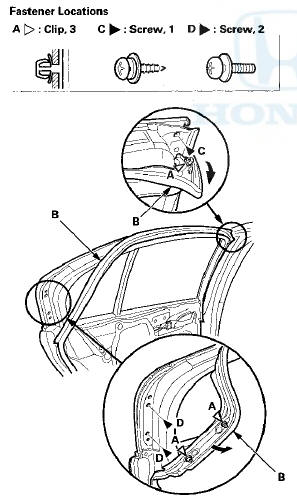
1. Detach the clips (A) with a clip remover, then pull back romn\/o th (C, D).
2. Pull out the upper edge of the door outer molding (A) from the edge of the sash, and cut the double-sided adhesive tape (B) with a utility knife, then remove the molding from the sash, and remove the molding from between the door glass outer weatherstrip (C) and the door.
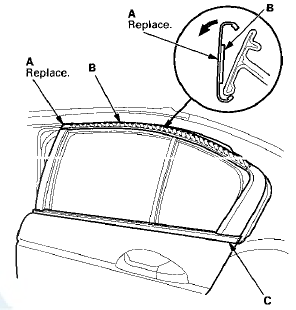
3. Scrape off remaining double-sided adhesive tape from the sash, then clean the sash surface with a shop towel dampened in isopropyl alcohol.
4. Install the door outer molding in the reverse order of removal, and note these items: - Insert the rear edge of the molding between the door glass outer weatherstrip and the door properly.
- Push adhesive areas into place securely.
- Make sure the upper and lower sides of the molding are catching the edges of the sash properly.
- Push the clips into place securely.
 Rear Door Glass Outer Weatherstrip
Replacement
Rear Door Glass Outer Weatherstrip
Replacement
4-door
NOTE:
- Put on gloves to protect your hands.
- Take care not to scratch the door.
1. Remove these items:
- Door panel {see page 20-38)
- Plastic cover, as needed (see step 3 on page 2 ...
 Rear Door Weatherstrip Replacement
4-door
NOTE;
- Put on gloves to protect your hands.
- Take care not to scratch the door.
- Take care not to damage the front upper
corner clip
(black) and the rear upper corner clips (black ...
See also:
Compass Operation
Compass operation can be affected
by driving near power lines or
stations, across bridges, through
tunnels, over railroad crossings, past
large vehicles, or driving near large
objects that c ...
Oil Seal Replacement
Special Tools Required
•Driver Handle, 15 x 135L 07749-0010000
•Oil Seal Driver Attachment 07947-SD90101
-Oil Seal Driver Attachment 07JAD-PH80101
1. Remove the oil seal from the transmi ...
A/F Sensor Replacement
Special Tools Required
02 Sensor Wrench Snap-on S6176 or equivalent,
commercially available
1. Disconnect the A/F sensor 4P connector (A), then
remove the A/F sensor (B).
2. Install the parts i ...