
 Honda Accord: Intermediate Shaft Installation
1. Clean the areas where the Intermediate shaft contacts the differential thoroughly with solvent, and dry then with compressed air.
NOTE: Do not wash the rubber parts with solvent.
2. Install a new set ring (A) onto the set ring groove (B) of the intermediate shaft (C).
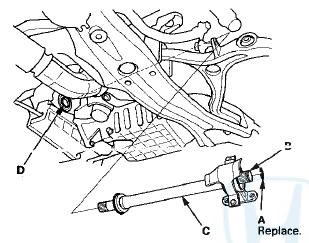
3. Insert the intermediate shaft into the differential correctly.
NOTE: Insert the intermediate shaft carefully to prevent damaging the oil seal (D).
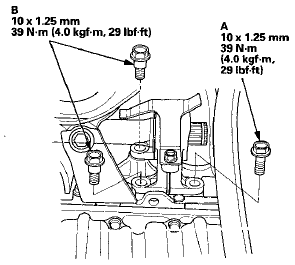
4. Install the flange bolt (A) and the two dowel bolts (B).
5. Install the right driveshaft (see page 16-19).
6. Refill the transmission with the recommended transmission fluid: -Manual transmission (see page 13-5) -Automatic transmission (see page 14-192) 7. Check the wheel alignment, and adjust it if necessary (see page 18-5).
8. Test-drive the vehicle.
 Intermediate Shaft Reassembly
Exploded View
Special Tools Required
-Oil Seal Driver 07GAD-PH70201
-Half Shaft Base 07NAF-SR30101
-Attachment 52 x 55 mm 07746-0010400
-Attachment 35 mm I.D. 07746-0030400
-Driver Handle, 15 ...
 Introduction
...
See also:
B-CAN System Diagnosis Test Mode
B
Do this diagnosis if any of the control units are not
communicating (Not Available is displayed in the HDS)
as found by the B-CAN System Diagnosis Test Mode A
(see page 22-134).
1. Using the HDS ...
Frame Repair Chart
Top View
g2 Front floor locating hole 025 (0.98) rear
h2 Front floor tunnel frame locating hole 013 (0.51) rear
i Rear frame A locating hole 025 (0.98)
j Rear floor locating hole 025 (0.98)
k1 ...
Cowl Cover Replacement
Special Tools Required
KTC Trim Tool Set SOJATP2014*
*Available through the Honda Tool and
Equipment
Program; call 888-424-6857
Cowl Cover Replacement
NOTE:
- Put on gloves to protect your han ...