
 Honda Accord: Driver's Inner Middle Pad
Removal/Installation
Special Tools Required
KTC Trim Tool Set SOJATP2014*
* Available through the Honda Tool and Equipment Program; call 888-424-6857
NOTE: -Take care not to scratch the dashboard or the related parts.
- Use the appropriate tool from the KTC trim tool set to avoid damage when removing components.
1. Remove these items: - Center pocket: - Without navigation system (see page 20-168) -With navigation system (see page 20-169) - Driver's inner dashboard trim (see page 20-167) - Passenger's dashboard trim (see page 20-173) - Dashboard center vent (with navigation system) (see page 20-178) - Audio-HVAC module: - Without navigation system (see page 23-115) - With navigation system (see page 21-190) 2. Gently pull out along the edge of the driver's inner middle pad (A) to release the hooks (B)r then remove the pad.
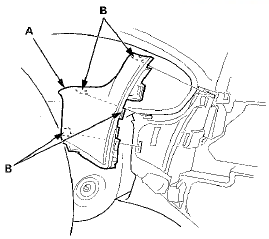
3. Install the pad in the reverse order of removal, and push the hooks into place securely.
 Driver's Outer Middle Pad
Removal/Installation
Special Tools Required
KTC Trim Tool Set SOJATP2014*
*Available through the Honda Tool and
Equipment
Program; call 888-424-6857
NOTE:
- Take care not to scratch the dashboard or the related
pa ...
 Passenger's Middle Pad
Removal/Installation
Special Tools Required
KTC Trim Tool Set SOJATP2014*
*Available through the Honda Tool and
Equipment
Program; call 888-424-6857
SRS components are located in this area. Review the
SRS component ...
See also:
Status Log
If you suspect there is a immobilizer system problem, check the status log.
1. Connect the HDS to the data link connector.
2. Turn the ignition switch to ON (II).
3. On the HDS screen, at MAI ...
Controls
...
Bluetooth HandsFreeLink
If equipped
Bluetooth HandsFreeLink (HFL)
allows you to place and receive
phone calls using voice commands,
without handling your cell phone.
To use HFL, you need a Bluetoothcompatible
cell ...