
 Honda Accord: Door Lock Knob Switch Test
Driver's Door
1. Remove the driver's door panel (see page 20-17).
2. Disconnect the 10P connector (A) from the door lock actuator (B).
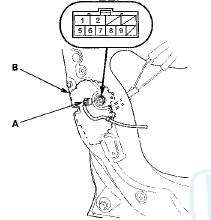
3. Check for continuity between the terminals.
• There should be continuity between terminals No. 6 and No. 5 when the door lock knob switch is in the LOCK position and no continuity when the switch is in the UNLOCK position.
• There should be continuity between terminals No. 7 and No. 5 when the door lock knob switch is in the UNLOCK position and no continuity when the switch is in the LOCK position.
4. If the continuity is not as specified, replace the door lock actuator.
Passenger Doors (With Security)
1. Remove the passenger's door panel.
• Front (see page 20-17) • Rear (see page 20-38) 2. Disconnect the 10P connector (A) from the door lock actuator (B).
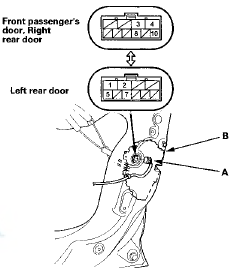
3. Check for continuity between the terminals.
There should be continuity between terminals No. 8 [No. 7] and No. 10 [No. 5] when the door lock knob switch in the UNLOCK position and no continuity when the switch is in the LOCK position.
[ ] : Left rear door
4. If the continuity is not specified, replace the door lock actuator.
 Door Lock Actuator Test
Driver's Door and Left Rear Door (4-door)
1 Remove the door panel.
• Front (see page 20-17)
• Rear (see page 20-38)
2. Disconnect the 10P connector (A) from the actuator
(B).
NOTE: T ...
 Door Key Cylinder Switch Test
1. Remove the driver's door panel (see page 20-17).
2. Disconnect the 10P connector (A) from the door lock
actuator (key cylinder switch) (B).
3. Check for continuity between the terminals.
...
See also:
Body
Special Tools
...
Front Seat Cushion Cover
Replacement
Special Tools Required
KTC Trim Tool Set SOJATP2014*
*Available through the Honda Tool and
Equipment
Program; call 888-424-6857
2-door
SRS components are located in this area. Review the
SRS c ...
Center Console Armrest Replacement
Special Tools Required
KTC Trim Tool Set SOJATP2014*
* Available through the Honda Tool and
Equipment
Program; call 888-424-6857
NOTE:
- Take care not to scratch the console.
- Use the appro ...