
 Honda Accord: Differential Carrier/Final Driven Gear Replacemen
1. Loosen the bolts in a crisscross pattern in several steps, then remove the bolts and the final driven gear (A) from the differential carrier (B).
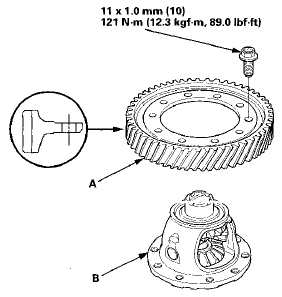
2. Install the final driven gear with the chamfer on the inside diameter facing the carrier. Tighten the bolts in a crisscross pattern in several steps.
 Backlash Inspection
1. Place the differential assembly on V-blocks (A), and
install the intermediate shaft (B) and the left driveshaft
(C).
2. Measure the backlash of both pinion gears (D) with a
dial indicator (E) ...
 Carrier Bearing Replacement
Special Tools Required
Driver Handle, 40 mm I.D. 07746-0030100
1. Check the carrier bearings for wear and rough
rotation. If they rotate smoothly and their rollers show
no signs of wear, the beari ...
See also:
The Passenger’s Front Airbag Can Pose Serious Risks
Front airbags have been designed to
help protect adults in a moderate to
severe frontal collision. To do this,
the passenger’s front airbag is quite
large, and it can inflate with enough
f ...
Remote Transmitter
LOCK - Press this button once to
lock both doors. Some exterior lights
will flash once. When you push
LOCK twice within 5 seconds, you
will hear a beep to verify that the
doors are locked ...
Rocker Arm and Shaft Disassembly/Reassembly
NOTE:
- Identify each part as it is removed so that each item can be
reinstalled in its original locations,
a Inspect the rocker arm shaft and rocker arms (see page 6-83).
- I ...