
 Honda Accord: Differential Carrier and Final Driven
Gear Replacement
Honda Accord: Differential Carrier and Final Driven
Gear Replacement
1. Remove the final driven gear (A) from the differential carrier (B).
NOTE: Differential carrier bolts have left-hand threads.
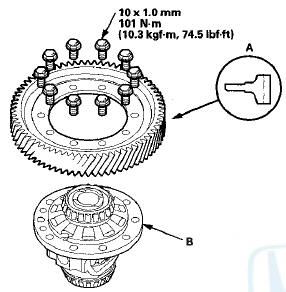
2. Install the final driven gear in the direction shown on the differential carrier.
3. Secure the final driven gear and the differential carrier with the bolts. Tighten the bolts to the specified torque in a crisscross pattern in at least two steps.
 Carrier Bearing Replacement
Special Tools Required
Attachment, 40 x 50 mm 07LAD-PW50601
NOTE:
-The bearing and the bearing outer race should be
replaced as a set.
-Inspect and adjust the carrier bearing
preload
wheneve ...
 Oil Seal Replacement
Special Tools Required
•Driver Handle, 15 x 135L 07749-0010000
•Oil Seal Driver Attachment 07947-SD90101
-Oil Seal Driver Attachment 07JAD-PH80101
1. Remove the oil seal from the transmi ...
See also:
Phone Setup
This command group is available for
paired cell phones.
Phone pairing tips
You cannot pair your phone while
the vehicle is moving.
Your phone must be in discovery
or search mode to pair. Refe ...
When Can a Larger Child Sit in Front
The National Highway Traffic Safety
Administration and Transport
Canada recommend that all children
aged 12 and under be properly
restrained in a back seat.
If the passenger’s front airbag ...
Circuit Diagram
...