
 Honda Accord: Dashboard Side Vent
Removal/Installation
Honda Accord: Dashboard Side Vent
Removal/Installation
Special Tools Required
KTC Trim Tool Set SOJATP2014*
* Available through the Honda Tool and Equipment Program; call 888-424-6857
NOTE; - Take care not to scratch the dashboard or the related parts.
- Use the appropriate tool from the KTC trim tool set to avoid damage when removing components.
- The driver's side vent is shown; the passenger's side vent is similar.
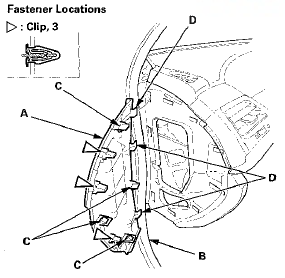
1. Remove these items: - Driver's side: Driver's outer dashboard trim (see page 20-167) - Passenger's side: Passenger's dashboard trim (see page 20-173) - Passenger's side: Passenger's dashboard side panel (see step 6 on page 20-175) 2. Driver's side: Open the front door, and remove the driver's dashboard side panel (A).
-1. Pull out the front door opening seal (B) as needed.
-2. Gently pry the rear edge of the panel with the appropriate trim tool to detach the clips and release the hooks (C, D).
3. Remove the screw. Pull out the dashboard side vent (A) to detach the clips, then remove the vent.
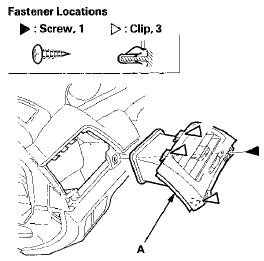
4. Install the side vent in the reverse order of removal, and note these items: - If the clips are damaged, replace them with new ones.
- Push the clips and the hooks into place securely.
 Glove Box Striker Replacement
SRS components are located in this area. Review the
SRS component locations, 2-door {see page 24-23),
4-door (see page 24-21) and the precautions and
procedures (see page 24-25) before doing repair ...
 Dashboard Center Vent
Removal / Installation
Dashboard Center Vent
Removal / Installation
Special Tools Required
KTC Trim Tool Set SOJATP2014*
*Available through the Honda Tool and Equipment
Program; call 888-424-6857
With Navigation Sf stem
NOTE:
- Take care not to scratch the dashb ...
See also:
XM Radio Display Messages
‘‘LOADING’’ - XM is loading the
audio or program information.
‘‘OFF AIR’’ - The channel currently selected is no
longer
broadcasting.
‘‘UPDATING’’ - The encryption code ...
Wiper Motor Test
4-door
1. Remove the driver's side wiper arm (see page
22-321).
2. Remove the left side cowl cover (see page 22-321).
3. Disconnect 5P connector (A) from the windshield
wiper motor (B).
4. ...
VSA Sensor Neutral Position Memorization
NOTE: Do not press the brake pedal during this
procedure.
1. Park the vehicle on a flat and level surface, with the
steering wheel in the straight ahead position.
2. With the ignition switch i ...