
 Honda Accord: Countershaft Bearing Replacement
Special Tools Required
-Adjustable Bearing Puller, 2 5 - 4 0 mm 07736-A01000B
-Driver Handle, 15 x 135L 07749-0010000
-Attachment, 62 x 68 mm 07746-0010500
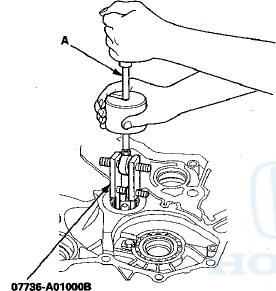
1. Remove the countershaft bearing using the 25—40 mm adjustable bearing puller and a commercially available 3/8 "-16 slide hammer (A).
2. Remove the ATF guide plate (A), and check it for wear and damage. If the guide plate is worn or damaged, replace it.
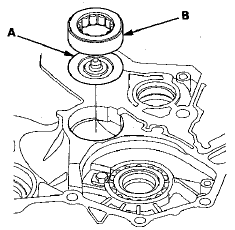
3. Install the ATF guide plate in the torque converter housing, and install a new countershaft bearing (B).
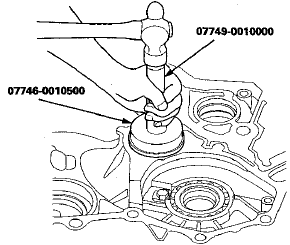
4. Install the countershaft bearing securely in the torque converter housing using the driver handle and the 62 x 68 mm attachment.
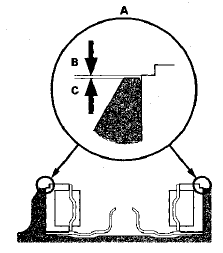
5. Make sure that the bearing outer race notch-cut (A) is installed at a height of 0—0.05 mm (0—0.002 in) (B) above the torque converter housing surface (C). Do not install the countershaft bearing higher than 0.05 mm (0.002 in) above the torque converter housing surface.
 Mainshaft Bearing and Oil Seal
Replacement
Mainshaft Bearing and Oil Seal
Replacement
Special Tools Required
-Adjustable Bearing Puller, 2 5 - 4 0 mm 07736-A01000B
-Driver Handle, 15 x 135L 07749-0010000
-Attachment, 62 x 68 mm 07746-0010500
-Attachment, 72 x 75 mm 07746-0010600
1 ...
 Secondary Shaft Bearing
Replacement
Secondary Shaft Bearing
Replacement
Special Tools Required
•Driver Handle, 15 x 135L 07749-0010000
•Attachment, 62 x 68 mm 07746-0010500
1. Remove the set plate bolt, then remove the lock
washer (A) and the bearing set pla ...
See also:
Washer Motor Test
1. Remove the right inner fender (see page 20-290).
2. Disconnect the 2P connector (A) from the windshield
washer motor (B).
USA models
3. Test the motor by connecting battery power to
term ...
Immobilizer Key Registration
NOTE:
• The HDS is required for registration of the immobilizer
keys.
• Programming the immobilizer also programs the
keyless transmitter.
• Check for aftermarket electrical eq ...
Fuel Line/Quick-Connect Fitting
Removal
NOTE: Before you work on the fuel lines and fittings,
read the Fuel Line/Quick-Connect Fitting Precautions
(see page 11-313).
1. If equipped, remove the quick-connect fitting cover
from the fuel ...