
 Honda Accord: Auxiliary Jack Assembly
Replacement
Honda Accord: Auxiliary Jack Assembly
Replacement
Eighth generation (2008–2012) / Honda Accord MK8 2008-2012 Service Manual / Audio, Navigation, and Telematics / Audio System / Auxiliary Jack Assembly
Replacement
1. Remove the center console (see page 20-158).
2. Disconnect the 5P connector (A), and carefully pull out the auxiliary jack assembly (B) from the center console box.
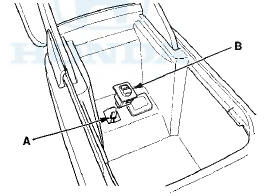
3. Install the auxiliary jack assembly in the reverse order of removal.
 XM Antenna Replacement
1. Remove the headliner (see page 20-140).
2. Remove the nut (A) from the XM antenna (B).
3. Disconnect the connector (C) and remove the XM
antenna.
4. Install the XM antenna in the reverse ...

See also:
Circuit Diagram
...
Odometer
The odometer shows the total
distance your vehicle has been
driven. It measures miles in U.S.
models and kilometers in Canadian
models. It is illegal under U.S.
federal law and Canadian provin ...
Adjust the Front Seats.
Adjust the driver’s seat as far to the
rear as possible while allowing you to
maintain full control of the vehicle.
Have a front passenger adjust their
seat as far to the rear as possible.
...