
 Honda Accord: Audio Remote Controls
Allows you to operate the audio system while driving.
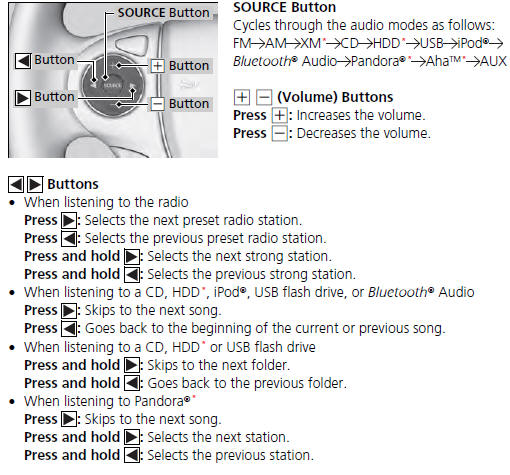
The CD mode appears only when a CD is loaded.

 Region Setting
The audio system’s region setting will be lost when the battery is
disconnected or
goes dead.
If the Region Select screen appears, you need to set the region for
the audio
system. Follow th ...
 Audio System Basic Operation
To use the audio system function, the ignition switch must be in ACCESSORY
or
ON
Use the selector knob or MENU button to
access some audio functions.
Press to switch between the
normal ...
See also:
Audio Unit Removal/Installation
With Navigation
SRS components are located in this area. Review the
SRS component locations (see page 24-23), and the
precautions and procedures (see page 24-25) before
doing repairs or service.
...
Cellular Phonebook
(available on some phones)
On models with navigation system
If you select Cellular Phone from
the Information screen menu, you
will see five HFL options.
For a list of cell phones that are
co ...
Rear Door Latch Replacement
4-door
NOTE: Put on gloves to protect your hands.
1. Remove the door panel and the inner handle (see
page 20-38).
2. Remove the plastic cover as needed (see step 3 on
page 20-42).
3. Detac ...