
 Honda Accord: Rear Bumper Finisher Cover
Replacement
Honda Accord: Rear Bumper Finisher Cover
Replacement
2-door
NOTE: - Put on gloves to prevent damage.
- Take care not to scratch the rear bumper or the body.
- When prying with a flat-tip screwdriver, wrap it with protective tape to prevent damage.
1. Remove the screw and detach the clips. Pull the rear bumper finisher cover (A) forward to release the hooks (B), then remove the cover from the rear bumper (C).
NOTE: To release the clips, pry up on the center pin at the notch <D).
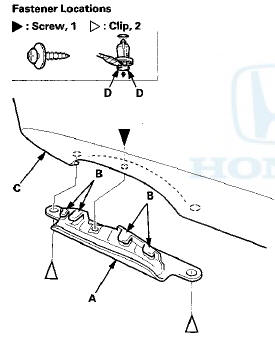
2. Install the cover in the reverse order of removal, and note these items: - If the clips are damaged or stress-whitened, replace them with new ones.
- Push the clips into place securely.
 Rear Bumper Removal/Installation
NOTE:
- Have an assistant help you when removing and
installing the rear bumper.
- Take care not to scratch the rear bumper or the body.
- Put on gloves to protect your hands.
- When prying ...
 Hood
Hood
...
See also:
XM Radio Display Messages
‘‘LOADING’’ - XM is loading the
audio or program information.
‘‘OFF AIR’’ - The channel currently selected is no
longer
broadcasting.
‘‘UPDATING’’ - The encryption code ...
Radiator and A/C Condenser Fan
Common Circuit Troubleshooting
NOTE:
• Do not use this troubleshooting procedure if only one
fan is inoperative, or if the A/C compressor is
inoperative. Refer to the symptom troubleshooting
index.
• Before doing s ...
Circuit Diagram
...