
 Honda Accord: Door Lock Actuator Test
Driver's Door and Left Rear Door (4-door)
1 Remove the door panel.
• Front (see page 20-17)
• Rear (see page 20-38)
2. Disconnect the 10P connector (A) from the actuator (B).
NOTE: The illustration shows the driver's door.
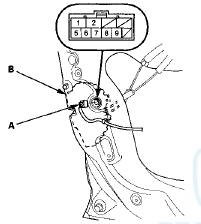
3. Check the actuator operation by connecting power and ground according to the table. To prevent damage to the actuator, apply battery voltage only momentarily.
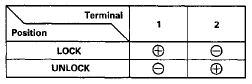
4. If the actuator does not operate as specified, replace it.
Front Passenger's Door and Right Rear Door (4-door)
1. Remove the door panel.
• Front (see page 20-17) • Rear (see page 20-38)
2. Disconnect the 10P connector (A) from the actuator (B).
NOTE: The illustration shows the front passenger's door.
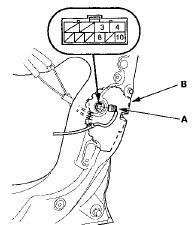
3. Check the actuator operation by connecting power and ground according to the table. To prevent damage to the actuator, apply battery voltage only momentarily.
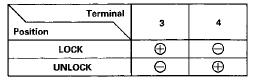
4. If the actuator does not operate as specified, replace it.
 Control Unit Input Test
NOTE: Before testing, troubleshoot the multiplex integrated control unit
first, using B-CAN System Diagnosis Test Mode
A (see page 22-134), and make sure the lighting system works properly.
Driver ...
 Door Lock Knob Switch Test
Driver's Door
1. Remove the driver's door panel (see page 20-17).
2. Disconnect the 10P connector (A) from the door lock
actuator (B).
3. Check for continuity between the terminals.
• ...
See also:
Playing a USB Flash Drive
Your audio system reads and plays sound files on a USB flash drive in either
MP3,
WMA, or AAC*1 format.
Connect your USB flash drive to the USB port, then select the USB mode.
• How to Sel ...
Piston, Pin, and Confyssfeg EQC
Replacement
Disassembly
1. Remove the piston from the engine block (see page
7-14).
2. Apply new engine oil to the piston pin snap rings (A),
and turn them in the ring grooves until the end gaps
are lined ...
Door Lock Knob Switch Test
Driver's Door
1. Remove the driver's door panel (see page 20-17).
2. Disconnect the 10P connector (A) from the door lock
actuator (B).
3. Check for continuity between the terminals.
• ...