
 Honda Accord: Shift Lock Solenoid Test
1. Connect the HDS to the DLC (A) located under the driver's side of the dashboard.
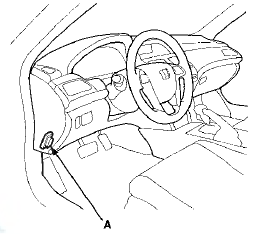
2. Turn the ignition switch to ON (II). Make sure the HDS communicates with the PCM. If it does not, go to the DLC circuit troubleshooting (see page 11-181).
3. Select Shift Lock Solenoid Test in the Miscellaneous Test Menu, and check that the shift lock solenoid operates with the HDS.
4. Check that the shift lever can be moved out of P when the Shift Lock Solenoid is ON. Move the shift lever back to P, and check that it locks with the Shift Lock Solenoid is OFF.
5. Check that the shift lock releases when the shift lock release is pushed, and check that it locks when the shift lock release is released.
6. If the shift lock solenoid does not work properly, go to the shift lock system troubleshooting (see page 14-249).
 Shift Lock System Circuit
Troubleshooting
Shift Lock System Circuit
Troubleshooting
1. Connect the HDS to the DLC (A) located under the
driver's side of the dashboard.
2. Turn the ignition switch to ON (II). Make sure the HDS
communicates with the PCM. If it does not, go to the
...
 Shift Lock Solenoid Replacement
Type A Shift Lever
1. Remove the shift lever assembly (see page 14-222).
2. Release the lock tabs (A) retaining the shift lock
solenoid using thin-bladed screwdrivers.
3. Insert a 6.0 mm (0.24 ...
See also:
Tire Pressure Monitoring System (TPMS) - Required Federal Explanation
Each tire, including the spare (if
provided), should be checked
monthly when cold and inflated to
the inflation pressure recommended
by the vehicle manufacturer on the
vehicle placard or tir ...
Gross VehicleWeight Rating (GVWR):
The maximum allowable weight of
the vehicle, all occupants, all
accessories, all cargo, and the
tongue load is:
U.S. models
LX:
4,299 lbs (1,950 kg)
EX and EX-L:
4,409 lbs (2,000 kg)
V6 mo ...
Auto Door Locking/Unlocking
Your vehicle has customizable
settings for the doors to
automatically lock and unlock. There
are default settings for each of these
features. You can turn off or change
the settings for thes ...