
 Honda Accord: Replacing a Front Turn Signal/Parking Light Bulb
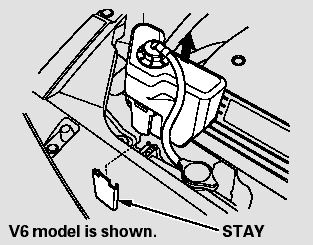
1. Open the hood.
To change the turn signal bulb on the passenger’s side, remove the engine coolant reserve tank by pulling it out of its stay.
Driver’s side on V6 models
Remove the air intake duct.
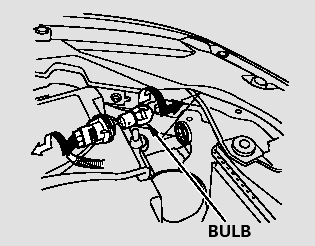
2. Remove the socket from the headlight assembly by turning it one-quarter turn counterclockwise.
3. To remove the burned out bulb, push it in and turn it counterclockwise until it unlocks.
4. Install the new bulb and turn it clockwise to lock it in place.
5. Insert the socket back into the headlight assembly. Turn it clockwise to lock it in place.
6. Turn on the lights to make sure the new bulb is working.
7. Passenger’s side
Reinstall the coolant reserve tank.
Driver’s side on V6 models
Reinstall the air intake cover and duct securely. Reinstall the fastener and secure it by pushing on the head until it locks.
 Replacing a Headlight Bulb
Your vehicle has halogen headlight
bulbs. When replacing a bulb, handle
it by its base, and protect the glass
from contact with your skin or hard
objects. If you touch the glass, clean
it wi ...
 Replacing a Front Side Marker Light Bulb
1. To change the bulb on the driver’s
side, start the engine, turn the
steering wheel all the way to the
right, then turn off the engine. To
change the bulb on the passenger’s
side, tu ...
See also:
What to Do If
California Proposition 65 Warning
WARNING: This product contains or emits
chemicals known to the state of California to cause
cancer and birth defects or other reproductive
harm.
Event Dat ...
Frame Repair Chart
Top View
g2 Front floor locating hole 025 (0.98) rear
h2 Front floor tunnel frame locating hole 013 (0.51) rear
i Rear frame A locating hole 025 (0.98)
j Rear floor locating hole 025 (0.98)
k1 ...