
 Honda Accord: Rear Seat-back Release Lever/Cable
Removal/Installation
Honda Accord: Rear Seat-back Release Lever/Cable
Removal/Installation
NOTE: - Take care not to bend or scratch the interior trim.
- 4-door is shown; 2-door is similar.
1. Remove the rear shelf (see page 20-128).
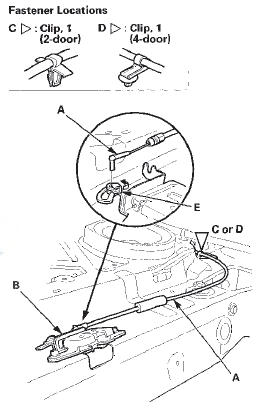
2. Disconnect the seat-back release cable (A) from the seat-back latch (B), and detach the cable clip (C) (2-door) or the cable clip (D) (4-door). Take care not to damage the cable fastener (E).
3. Open the trunk lid.
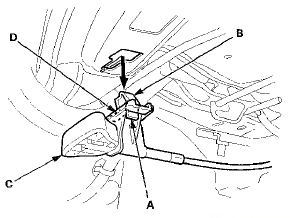
4. From the trunk compartment, push the tab (A) to release the hook (B), and slide the seat-back release lever (C) inward to release the hook (D), then remove it by pulling it out.
5. Install the release lever/cable in the reverse order of removal, and note these items: - If the clip is damaged or stress-whitened, replace it with a new one.
- Push the clip and the hooks into place securely.
- Make sure the release cable is connected securely.
- Make sure the seat-back locks securely and unlocks properly.
 Rear Seat-back Latch Replacement
NOTE:
- Take care not to bend or scratch the interior trim.
- 4-door is shown; 2-door is similar.
1. Remove the rear shelf (see page 20-128).
2. Disconnect the seat-back release cable (A) fr ...
 Rear Seat Armrest Replacement
Special Tools Required
KTC Trim Tool Set SOJATP2014*
*Available through the Honda Tool and
Equipment
Program; call 888-424-6857
4-door
NOTE:
- Use the appropriate tool from the KTC trim tool s ...
See also:
Receiving XM Radio Service
If your XM Radio service has expired
or you purchased your vehicle from
a previous owner, you can listen to a
sampling of the broadcasts available
on XM Radio. With the ignition
switch in th ...
Auxiliary Input Jack
The auxiliary input jack is inside the
console compartment. The system
will accept auxiliary input from
standard audio accessories using a
1/8 inch (3.5 mm) stereo miniplug.
When you plug i ...
System Description
Overview
The electrical compass shows the azimuth information in 8-directions (N, NE,
E, SE, S, SW, W, NW) to the audio-HVAC
display unit via the audio unit.
Starting Operation
When the igniti ...