
 Honda Accord: Rear Bumper Finisher Cover
Replacement
Honda Accord: Rear Bumper Finisher Cover
Replacement
2-door
NOTE: - Put on gloves to prevent damage.
- Take care not to scratch the rear bumper or the body.
- When prying with a flat-tip screwdriver, wrap it with protective tape to prevent damage.
1. Remove the screw and detach the clips. Pull the rear bumper finisher cover (A) forward to release the hooks (B), then remove the cover from the rear bumper (C).
NOTE: To release the clips, pry up on the center pin at the notch <D).
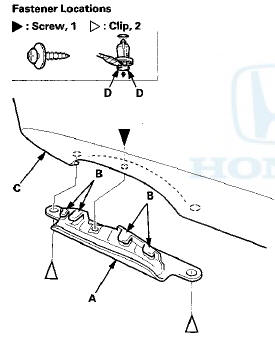
2. Install the cover in the reverse order of removal, and note these items: - If the clips are damaged or stress-whitened, replace them with new ones.
- Push the clips into place securely.
 Rear Bumper Removal/Installation
NOTE:
- Have an assistant help you when removing and
installing the rear bumper.
- Take care not to scratch the rear bumper or the body.
- Put on gloves to protect your hands.
- When prying ...
 Hood
Hood
...
See also:
Replacing a Fog Light Bulb
If equipped
Your vehicle uses halogen light
bulbs. When replacing a bulb, handle
it by its plastic case, and protect the
glass from contact with your skin or
hard objects. If you touch the gl ...
AM/FM Antenna Repair
NOTE: To make an effective repair, the broken section
must be no longer than one Inch.
1. Lightly rub the area around the broken section (A)
with fine steel wool, then clean it with isopropyl
al ...
Rocker Arm Assemblf Installation
1. Reassemble the rocker arm assembly (see page 6-82).
2. Clean and dry the No. 5 rocker shaft holder mating
surface.
3. Apply liquid gasket P/N 08717-0004, 08718-0003, or
08718-0009 to the cy ...