
 Honda Accord: Opening/Closing theWindows and Moonroof with the Key
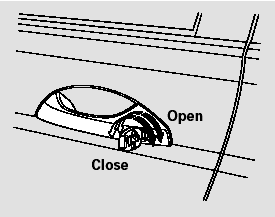
You can open and close the windows and the moonroof (if equipped) with the key in the driver’s door lock.
To open:
1. Insert the key in the driver’s door lock.
2. Turn the key clockwise, then release it.
3. Turn the key clockwise again, and hold it. Both windows and the moonroof start to open. To stop the windows and the moonroof, release the key.
4. To open the windows and the moonroof further, turn and hold the key again (within 10 seconds of step 2).
To close:
1. Insert the key in the driver’s door lock.
2. Turn the key counterclockwise, then release it.
3. Turn the key counterclockwise again, and hold it. Both windows and the moonroof start to close.
To stop the windows and the moonroof, release the key.
4. To close the windows and the moonroof further, turn and hold the key again (within 10 seconds of step 2).
NOTE: If the windows and the moonroof stop before the desired position, repeat steps 2 and 3.
 Opening theWindows and Moonroof with the Remote Transmitter
You can open both windows and the
moonroof (if equipped) from the
outside with the remote transmitter.
1. Press the UNLOCK button once
to unlock the driver’s door.
2. Press the UNLOCK butt ...
 Moonroof
If equipped
The moonroof can be tilted up in the
back for ventilation, or it can be slid
back into the roof. Use the switch on
the front ceiling to operate the
moonroof. You must turn the
...
See also:
Ball Joint Removal
Special Tools Required
- Ball Joint Thread Protector, 14 mm 07AAE-SJAA100
- Ball Joint Thread Protector, 12 mm 07AAF-SDAA100
- Ball Joint Thread Protector, 10 mm 07AAF-SECA120
- Ball Joint Remover ...
Audio Remote Controls
Allows you to operate the audio system while driving.
The CD mode appears only when a CD is loaded.
...
Adjust the Seat-Backs
Adjust the driver’s seat-back to a
comfortable, upright position,
leaving ample space between your
chest and the airbag cover in the
center of the steering wheel.
Passengers with adjustab ...