
 Honda Accord: Oil Pressure Switch Test
1 Disconnect the oil pressure switch connector (A) from the oil pressure switch (B).
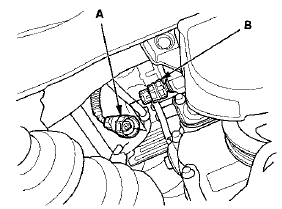
2. Check for continuity between the oil pressure switch terminal and the engine (ground). There should be continuity with the engine stopped. There should be no continuity with the engine running.
 Low Oil Pressure Indicator Circuit Troubleshooting (Short)
1. Connect the Honda Diagnostic System (HDS) to the
data link connector (DLC) (see step 2 on page 11-3).
2. Turn the ignition switch to ON (II).
3. Make sure the HDS communicates with the vehic ...
 Oil Pressure Switch Replacement
1. Disconnect the oil pressure switch connector (A), then
remove the oil pressure switch (B).
2. Remove any old liquid gasket from the switch and
switch mounting hole.
3. Apply a very small am ...
See also:
Carrying Cargo
Your vehicle has several convenient
storage areas:
Glove box
Door and seat-back pockets
Roof-rack (if installed)
Center pockets
Console compartment
Trunk, including the rear seat
when fold ...
Maintain a Proper Sitting Position
After all occupants have adjusted
their seats and head restraints, and
put on their seat belts, it is very
important that they continue to sit
upright, well back in their seats, with
their f ...
Rocker Arm Assembly Removal
1 Remove the cam chain (see page 6-62).
2. Loosen the rocker arm adjusting screws (A).
3. Remove the camshaft holder bolts. To prevent
damaging the camshafts, loosen the bolts, in
sequence, tw ...