
 Honda Accord: Front Splash Shield Replacement
NOTE: - Put on gloves to protect your hands.
- Take care not to scratch the body.
- When prying with a flat-tip screwdriver, wrap it with protective tape to prevent damage.
- 4-door is shown; 2-door is similar.
1. Remove the front wheel.
2. Remove the front splash shield (A).
-1. Detach the clip (B) that secures the front splash shield to the body.
-2. Detach the clips (C) that secure the front inner fender (D) and the front splash shield to the body.
-3. From under the front bumper (E), detach the clips (F) that secure the front bumper, the front inner fender, and the front splash shield to the body.
-4. From under the front bumper, detach the clips (G) that secure the front bumper and the front splash shield to the body.
-5. From under the body, detach the clips (H) that secure the front splash shield to the front subframe.
-6. Release the hooks (I) of the front splash shield, then pull out the splash shield.
NOTE: To release the clips, pry up on the center pin at the notch (J).
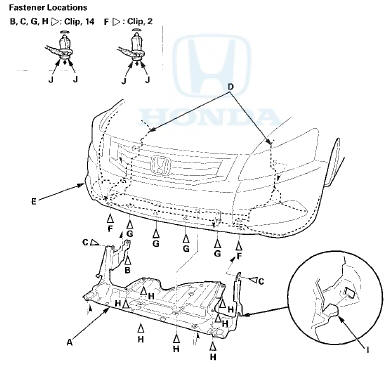
3, Install the splash shield in the reverse order of removal, and note these items: - If the clips are damaged or stress-whitened, replace them with new ones.
- Push the clips and the hooks into place securely.
 Front Inner Fender Replacement
NOTE:
- Put on gloves to protect your hands.
- Take care not to scratch the body.
- When prying with a flat-tip screwdriver, wrap it with protective tape to
prevent damage.
1. Remove the f ...
 Front Fender Fairing Replacement
For Some Models
NOTE;
- Take care not to scratch the body.
- Put on gloves to protect your hands.
1. Remove the front Inner fender as needed (see page
20-290).
2. From the wheel arch, rele ...
See also:
Safety Labels
Label Locations
These labels are in the locations shown. They warn you of potential hazards
that can cause serious injury or death. Read these labels
carefully.
If a label comes off or becomes h ...
Main Valve Body Disassembly,
Inspection, and Reassembly
1. Clean all parts thoroughly in solvent, and dry them with compressed air.
Blow out all passages.
2. Do not use a magnet to remove the check balls, it may magnetize the balls.
3. Inspect the ...
Wind Deflector Replacement
NOTE: When prying with a flat-tip screwdriver, wrap it
with protective tape to prevent damage.
1. Open the glass fully.
2. Remove the deflector links (A) from both sides.
3. Remove the wind ...