
 Honda Accord: Clutch Pedal Assembly Replacement
1. Disconnect the clutch pedal position switch connector (A) and the clutch interlock switch connector (B).
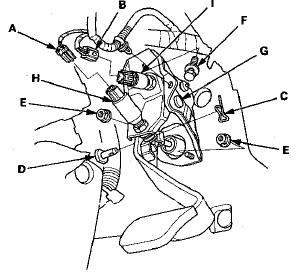
2. Pry out the lock pin (C), and pull the clevis pin (D) out of the clevis.
3. Remove the master cylinder mounting nuts (E) and the clutch pedal mounting bolt (F).
4. Remove the clutch pedal assembly (G).
5. Remove the clutch pedal position switch (H) and the clutch interlock switch (I).
6. Loosely install the clutch pedal position switch (A) and the clutch interlock switch (B).
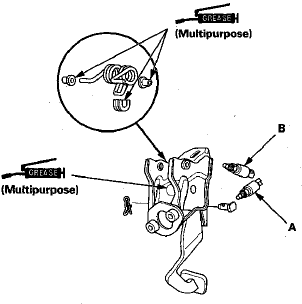
7. Install the clutch pedal assembly (A).
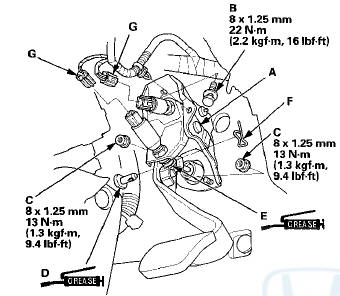
8. Install the clutch pedal mounting bolt (B) and the master cylinder mounting nuts (C).
9. Apply multipurpose grease to the clevis pin (D), and the mating surfaces (E) of the clevis and the pedal.
Slide the clevis pin into the clevis, then install the lock pin (F).
10. Adjust the clutch pedal, the clutch pedal position switch, and the clutch interlock switch (see page 12-7).
NOTE: Connect the switch connectors (G) after adjusting them.
11. Check the clutch operation.
 Clutch Pedal, Clutch Pedal Position Switch, and
Clutch Interlock Switch Adjustment
Clutch Pedal, Clutch Pedal Position Switch, and
Clutch Interlock Switch Adjustment
NOTE:
- For a cruise control problem, check the clutch pedal
position switch (see page 4-45).
- For a clutch interlock operation problem, check the
clutch interlock switch (see page 4-9).
- R ...
 Clutch Master Cylinder Replacement
NOTE:
- Use fender covers to avoid damaging
painted
surfaces.
- Do not spill brake fluid on the vehicle; it may damage
the paint or plastic. If brake fluid does contact the paint
or plastic, ...
See also:
Mainshaft Thrust Clearance Adjustment
Special Tools Required
- Mainshaft Holder 07GAJ-PG20110
- Mainshaft Base 07GAJ-PG20130
1. Remove the 72 mm shim (A) and oil guide plate M
from the transmission housing (B).
2. Thoroughly clea ...
Fan Controls
Component Location Index
Symptom Troubleshooting Index
'08-09 models
10 model
Circuit Diagram
'08-09 models
'10 model
Radiator Fan Circuit Troubleshooting
'08-09 models
1 ...
Circuit Diagram
...