
 Honda Accord: XM Receiver Removal/Installation
1. Open the trunk lid, and remove the right trunk side trim panel {see page 20-132).
2. Disconnect the connectors (A) from the XM receiver (B).
4-Door
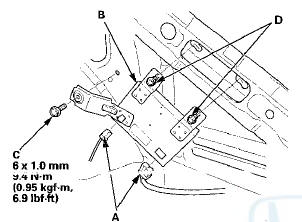
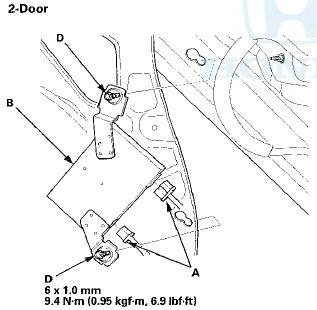
3. Remove the mounting bolt (C) and loosen the mounting bolts (D), then remove the XM receiver.
4. Install the XM receiver in the reverse order of removal.
 Stereo Amplifier
Removal/Installation
Stereo Amplifier
Removal/Installation
With Premium Audio System
1. Remove the glove box (see page 20-174).
2. Disconnect the connectors (A).
3. Remove the bolt (B) and loosen the bolts (C) securing
the stereo amplifier (D).
4. ...
 Active Noise Cancellation
Microphone
Removal/Installation
Active Noise Cancellation
Microphone
Removal/Installation
Front
1. Remove the roof console (see page 20-140), and
disconnect the connector (A) from the front active
noise cancellation microphone (B).
2. Remove the screws and the front active noise
can ...
See also:
Driver and Passenger Safety
This section gives you important
information about how to protect
yourself and your passengers. It
shows you how to use seat belts. It
explains how your airbags work. And
it tells you how to ...
Changing a Flat Tire
If you have a flat tire while driving,
pull over safely. Drive slowly along
the shoulder until you get to an area
far away from traffic lanes.
The vehicle can easily roll off
the jack, se ...
Navigation Display Unit
Removal/Installation
1 Remove the audio unit (see page 23-114), then
remove the center display visor (see page 20-171).
2. Remove the screws and bolts (A), then pull out the
navigation display unit (B).
3. Install ...