
 Honda Accord: XM Antenna Replacement
1. Remove the headliner (see page 20-140).
2. Remove the nut (A) from the XM antenna (B).
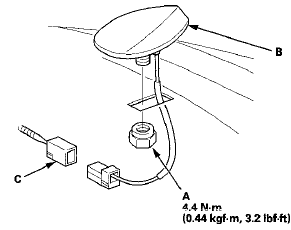
3. Disconnect the connector (C) and remove the XM antenna.
4. Install the XM antenna in the reverse order of removal.
 AM/FM Antenna Repair
NOTE: To make an effective repair, the broken section
must be no longer than one Inch.
1. Lightly rub the area around the broken section (A)
with fine steel wool, then clean it with isopropyl
al ...
 Auxiliary Jack Assembly
Replacement
Auxiliary Jack Assembly
Replacement
1. Remove the center console (see page 20-158).
2. Disconnect the 5P connector (A), and carefully pull out
the auxiliary jack assembly (B) from the center
console box.
3. Install the auxiliary ...
See also:
Safety When Performing Maintenance
Some of the most important safety precautions are given here.
However, we cannot warn you of every conceivable hazard that can arise in
performing maintenance. Only you can decide whether or not ...
Vanity Mirror
To use the vanity mirror on the back
of the sun visor, pull up the cover.
The vanity mirror lights come on
when you pull up the cover. ...
Selecting a Memorized Position
To select a memorized position, do
this:
1. Make sure the parking brake is set
and the shift lever is in Park
(automatic).
2. Press the desired memory button
(1 or 2) until you hear a beep ...