
 Honda Accord: Auxiliary Jack Assembly
Replacement
Honda Accord: Auxiliary Jack Assembly
Replacement
1. Remove the center console (see page 20-158).
2. Disconnect the 5P connector (A), and carefully pull out the auxiliary jack assembly (B) from the center console box.
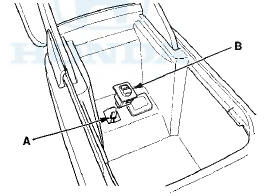
3. Install the auxiliary jack assembly in the reverse order of removal.
 XM Antenna Replacement
1. Remove the headliner (see page 20-140).
2. Remove the nut (A) from the XM antenna (B).
3. Disconnect the connector (C) and remove the XM
antenna.
4. Install the XM antenna in the reverse ...

See also:
Adjusting the Sound
1. Press the SETTINGS button.
2. Rotate to select Audio
Settings, then
press .
3. Rotate to select Sound,
then press .
Rotate to scroll through the
following
choices:
The SVC ...
General Troubleshooting Information
Sf stem Indicator
This system has four indicators;
- ABS indicator (A)
- Brake system indicator (B)
- VSA indicator (C)
- VSA activation indicator (D)
When the system is OK, each indicator com ...
Power Windows
Turn the ignition switch to the ON
(II) position to raise or lower either
window. To open a window, push the
switch down and hold it. Release the
switch when you want the window to
stop. P ...