
 Honda Accord: To Play the FM/AM Radio
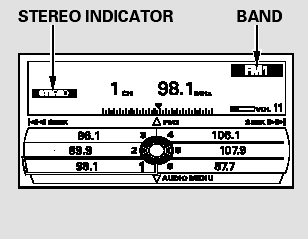
The ignition switch must be in the ACCESSORY (I) or the ON (II) position. Press the AUDIO button to view the audio control display. Turn the system on by pressing the power/volume knob or the FM/AM button. Adjust the volume by turning the power/volume knob.
The band and frequency that the radio was last tuned to are shown on the display. To change bands, press the FM/AM button. You can also change bands by pushing the interface selector up. Each time you push it up, the band will change to FM1, FM2, or AM. On the FM bands, STEREO will be shown on the navigation screen and ST on the center display, if the station is broadcasting in stereo. Stereo reproduction on AM is not available.
On the AM band, AM noise reduction turns on automatically.
 Playing the FM/AM Radio (Models with navigation system)
Playing the FM/AM Radio (Models with navigation system) ...
 To Select a Station
You can use any of five methods to
find radio stations on the selected
band: tune, skip (seek), scan, the
preset buttons, and auto select.
On the FM band, you can also use
the features provid ...
See also:
Low Fuel Indicator Test
1. Do the gauge self-diagnostic test (see page 22-332).
- If the low fuel indicator flashes, go to step 2.
- If the low fuel indicator does not flash, replace the
gauge control module (see page ...
Adjust the Front Seats.
Adjust the driver’s seat as far to the
rear as possible while allowing you to
maintain full control of the vehicle.
Have a front passenger adjust their
seat as far to the rear as possible.
...