
 Honda Accord: Floor Mats
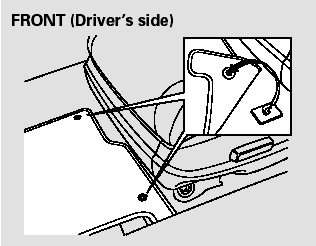
The driver’s and right rear passenger’s floor mats that came with your vehicle hook over the floor mat anchors. This keeps the floor mats from sliding forward and possibly interfering with the pedals (driver’s floor mat) or with the seat weight sensors (right rear floor mat).

If you remove a floor mat, make sure to re-anchor it when you put it back in your vehicle.
If you use a non-Honda floor mat, make sure it fits properly and that it can be used with the floormat anchors. Do not put additional floor mats on top of the anchored mat.
 Cleaning the Seat Belts
If your seat belts get dirty, use a soft
brush with a mixture of mild soap
and warm water to clean them. Do
not use bleach, dye, or cleaning
solvents. Let the belts air dry before
you use ...
 Dust and Pollen Filter
This filter removes the dust and
pollen that is brought in fromthe
outside through the heating and
cooling system/climate control
system.
Have your dealer replace this filter
when this serv ...
See also:
Rear Brake Disc Inspection
Runout
1. Raise and support the vehicle (see page 1-13).
2. Remove the rear wheels.
3. Remove the brake pads (see page 19-31),
4. Inspect the brake disc to wheel surface for damage
and cracks ...