
 Honda Accord: Cellular Phonebook
(available on some phones)
On models with navigation system
If you select Cellular Phone from the Information screen menu, you will see five HFL options.
For a list of cell phones that are compatible with this feature:
In the U.S., visit handsfreelink.honda.
com or call (888) 528-7876.
In Canada, visit www.handsfreelink.ca, or call (888) 528-7876.
Import Cellular Phonebook:
The entire phonebook data of the cell phone that is linked to HFL can be imported to the navigation system.
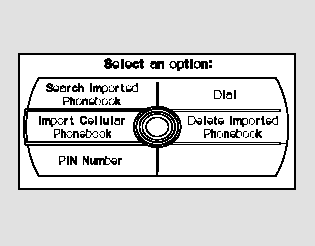
Select ‘‘Import Cellular Phonebook,’’ and HFL will begin importing the phonebook. Select ‘‘OK’’ after the import is completed.
Search Imported Phonebook:
Once a phonebook has been imported, you can search the phone numbers by the person’s name.
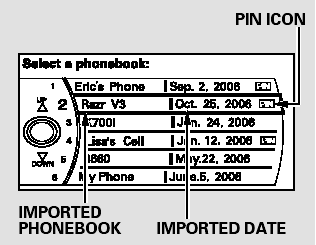
Select ‘‘Search Imported Phonebook,’’ and a list of imported phonebooks will be displayed.
Select a phonebook from the list.
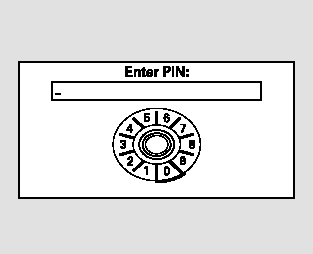
If the phonebook is PIN-protected, you will need to enter the 4-digit PIN.
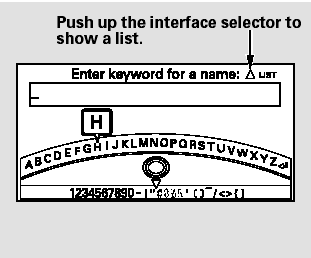
To search for a specific name in the phonebook, enter the keyword for either the first or last name.
To display all names in the phonebook, select the ‘‘List’’ option.
Select a person from the list. Up to three category icons are displayed in the left side of the list:
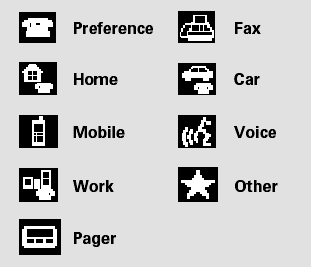
These indicate how many numbers are stored for the name. If a name has more than three category icons, ‘‘…’’ is displayed.
Select the person’s number you want to call, and press the HFL Talk button.
Delete Imported Phonebook:
You can delete any imported phonebook.
Select ‘‘Delete Imported Phonebook,’’ and a list of imported phonebooks will be displayed.
Select a phonebook you want to delete. If the phonebook is PINprotected, you will need to enter the 4-digit PIN number.
After making a selection, the following screen will appear.
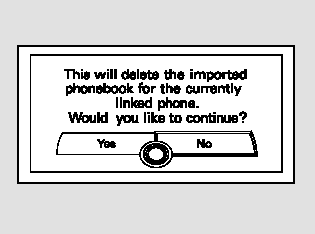
Select ‘‘Yes,’’ then ‘‘OK’’ to complete the deletion.
 Transferring a Call
You can transfer a call from HFL to
your phone, or from your phone to
HFL.
Press and release the HFL Talk
button and say ‘‘Transfer.’’ ...
 PIN Number
You can add, change, or remove a
PIN number from any phonebook.
To add a PIN:
If you have selected a phonebook
without a PIN, you will see the above
display.
Enter the new 4-digit PIN. You ...
See also:
MICU Input Test
NOTE:
• Before testing, troubleshoot the multiplex
integrated control unit first, using B-CAN System Diagnosis Test Mode A
(see page 22-134).
• Before testing, make sure the No. 5 (7. ...
Cylinder Head Inspection for
Warpage
1. Remove the cylinder head (see page 6-76).
2. Inspect the camshaft (see page 6-84).
3. Check the cylinder head for warpage. Measure along
the edges, and three ways across the center.
- If ...
Coat Hook
To use a coat hook, pull it down.
Close it with a firm push.
Make sure the coat hook is closed
when you are not using it. This hook
is not designed for large or heavy
items. ...