
 Honda Accord: Trim Remowal/Installatlon - Rear Side Area
Special Tools Required
KTC Trim Tool Set SOJATP2014*
*Available through the Honda Tool and Equipment Program; call 888-424-6857
2-door
SRS components are located in this area. Review the SRS component locations {see page 24-23) and the precautions and procedures (see page 24-25) before doing repairs or service.
NOTE: - Put on gloves to protect your hands.
- Take care not to bend or scratch the trim or the panels.
- Use the appropriate tool from the KTC trim tool set to avoid damage when removing components.
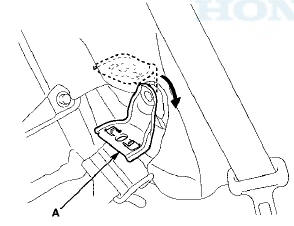
1. Remove these items: - Door sill trim (see page 20-105) - C-pillar trim (see page 20-123) - Rear seat-back (see page 20-239) - Rear seat cushion (see page 20-241) 2. Lower the rear seat pivot bracket (A).
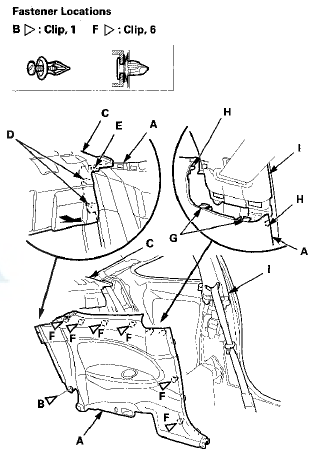
3. Remove the rear side trim panel (A).
-1. Detach the clip (B).
-2. Gently pull back the rear shelf (C) to release the projections (D) and the hook (E) from the panel.
-3. Detach the clips (F) by pulling back the panel.
-4. Release the hooks (G) and the tabs (H) from the B-pillar upper trim (I).
4. Install the panel in the reverse order of removal, and note these items: - If the clips are damaged or stress-whitened, replace them with new ones.
- Push the clips, the hooks, and the tabs into place securely.
 Trim Removal/Installation - Pillar
Areas
Trim Removal/Installation - Pillar
Areas
Special Tools Required
KTC Trim Tool Set SOJATP2014*
*Available through the Honda Tool and
Equipment
Program; call 888-424-6857
A-Pillar Trim
SRS components are located in this area. Review the ...
 Trim Removal/Installation - Rear Shelf Area
Special Tools Required
KTC Trim Tool Set SOJATP2014*
*Available through the Honda Tool and
Equipment
Program; call 888-424-6857
Rear Shelf
SRS components are located in this area. Review the
S ...
See also:
Knuckle/Hub Bearing Unit Replacement
Exploded View
Special Tools Required
- Ball Joint Thread Protector, 14 mm
07AAE-SJAA100
- Ball Joint Remover, 32 mm 07MAC-SL0A102
Hub Bearing Unit Replacement
1. Raise and support the vehicle ...
Tire Pressure Monitoring System (TPMS) -Required Federal Explanation
Each tire, including the spare (if provided), should be checked monthly when
cold and inflated to the inflation pressure recommended by the vehicle
manufacturer on the vehicle placard or tire infl ...
SRS Unit Replacement
Removal
1. Do t h e b a t t e r y t e r m i n a l d i s c o n n e c t i o n procedure
(see
page 22-91), t h e n w a i t at least 3 m i n u t e s before
s t a r t i n g work.
2. Remove t h e d ...