
 Honda Accord: Mode Control Motor Test
NOTE: Before testing the motor, check for HVAC DTCs (see page 21-101).
1. Disconnect the 7P connector from the mode control motor.

Incorrectly applying power and ground to the mode control motor will damage it Follow the instructions carefully.
2. Connect battery power to terminal No. 1 of the mode control motor, and ground terminal No. 2;the mode control motor should run, and stop at Defrost. If it doesn't, reverse the connections; the mode control motor should run, and stop at Vent When the mode control motor stops running, disconnect battery power immediately.
MODE CONTROL MOTOR
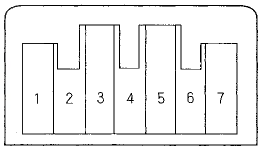
3. If the mode control motor did not run in step 2, remove it, then check the mode control linkage and door for smooth movement.
• If the linkage and door move smoothly, replace the mode control motor (see page 21-62).
• If the linkage or door sticks or binds, repair them as needed.
• If the mode control motor runs smoothly, go to step 4.
4. Measure the resistance between terminals No. 5 and No. 7 of the mode control motor. It should be between 4.2 and 7.8 kO.
5. Reconnect the mode control motor 7P connector, then turn the ignition switch to ON (II).
6. Using the backprobe set, measure the voltage between terminals No. 3 and No. 7 of the 7P connector.
Vent: About 0.5 V
Defrost: About 4.5 V
7. If either the resistance or the voltage readings are not as specified, replace the mode control motor (see page 21-62).
 Passenger's Air Mix Control Motor
Replacement
Passenger's Air Mix Control Motor
Replacement
1. Remove the glove box (see page 20-174).
2, Disconnect the 4P connector (A) from the power
transistor (B), and the 7P connector (C) from the
passenger's air mix control motor (D). Remove the
s ...
 Recirculation Control Motor Test
NOTE: Before testing the motor, check for HVAC DTCs
(see page 21-101).
1. Disconnect the 7P connector from the recirculation
control motor.
Incorrectly applying power and ground to the
recirc ...
See also:
If the Brake System Indicator (Red)Comes On
• Reasons for the indicator to come on
• The brake fluid is low.
• There is a malfunction in the brake system.
• What to do when the indicator comes on while driving
Press the brake ped ...
Symptom Troubleshooting Index
Find the symptom in the chart below, and do the related procedures in the
order listed until you find the cause.
...