
 Honda Accord: Electrical Compass Unit Input
Test
Honda Accord: Electrical Compass Unit Input
Test
1. Remove the rear shelf (see page 20-128).
2. Loosen the bolts (A), then pull out the electrical compass unit bracket (B).
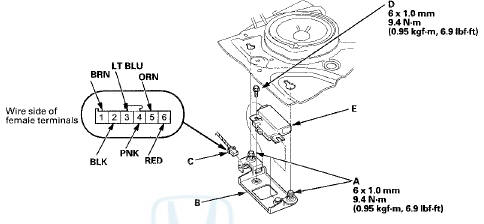
3. Disconnect the 6P connector (C) and remove the mounting bolt ( D ) , then pull out the electrical compass unit (E).
4. Inspect the connector and socket terminals to make sure they are all making good contact.
• If the terminals are bent, loose, or corroded, repair them as necessary, and recheck the system.
• If the terminals look OK, go to step 5.
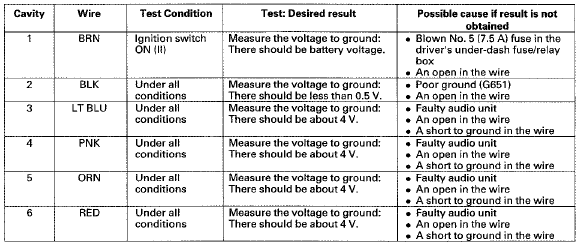
5. Reconnect the electrical compass unit BP connector. Turn the ignition switch to ON (ll), and do the following input tests at the connectors.
• If any test indicates a problem, find and correct the cause, then recheck t h e system.
• If all input t e s t s p r o v e OK, t h e electrical compass unit is faulty; replace it, and do the compass calibration (see page 23-247).
 Electrical Compass Zone Selection
and Calibration
Electrical Compass Zone Selection
and Calibration
NOTE:
• You should do this procedure any time the electrical
compass unit is replaced.
• You should do this procedure in an open area away
from buildings, power lines, and other vehicl ...

See also:
B-CAN System Diagnosis Test Mode
C
Do this diagnosis if a component that is controlled by the
B-CAN system does not stop or turn off.
NOTE:
• If the component does not turn on, go to B-CAN
System Diagnosis Test Mode D {see p ...
All ChildrenMust Be Restrained
Each year, many children are injured
or killed in vehicle crashes because
they are either unrestrained or not
properly restrained. In fact, traffic
collisions are the number one cause
of dea ...
A/C System Noise Check
• Air conditioning refrigerant or lubricant vapor can
irritate your eyes, nose, o r throat.
• Be careful when connecting service equipment.
• Do not breathe refrigerant or vapor. ...