
 Honda Accord: Checking the Battery
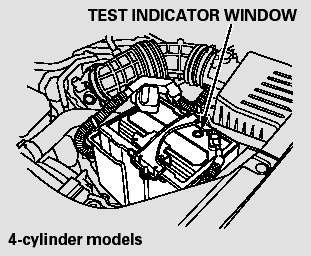
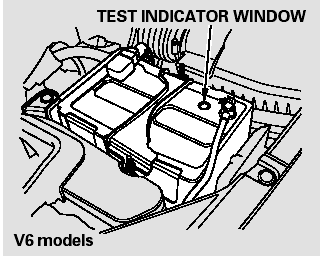
Check the condition of the battery monthly by looking at the test indicator window. The label on the battery explains the test indicator’s colors.
The location of the test indicator window varies between manufacturers.
Check the terminals for corrosion (a white or yellowish powder). To remove it, cover the terminals with a solution of baking soda and water. It will bubble up and turn brown. When this stops, wash it off with plain water. Dry off the battery with a cloth or paper towel. Coat the terminals with grease to help prevent future corrosion.
If additional battery maintenance is needed, see your dealer or a qualified mechanic.
WARNING: Battery posts, terminals, and related accessories contain lead and lead compounds.
Wash your hands after handling.
If you need to connect the battery to a charger, disconnect both cables to prevent damaging your vehicle’s electrical system. Always disconnect the negative ( - ) cable first, and reconnect it last.

The battery gives off explosive hydrogen gas during normal operation.
A spark or flame can cause the battery to explode with enough force to kill or seriously hurt you.
Wear protective clothing and a face shield, or have a skilled technician do the battery maintenance.
If your vehicle’s battery is disconnected, or goes dead, the time setting may be lost.
If your vehicle’s battery is disconnected or goes dead, the audio system may disable itself. The next time you turn on the radio, you will see ‘‘ENTER CODE’’ in the frequency display. Use the preset buttons to enter the code.
On models with navigation system
The navigation system will also disable itself. The next time you turn on the ignition switch, the system will require you to enter a PIN before it can be used. Refer to the navigation system manual.
 Wheels
Clean the wheels as you would the
rest of the exterior. Wash them with
the same solution, and rinse them
thoroughly.
Aluminum alloy wheels have a
protective clear-coat that keeps the
alumin ...
 Vehicle Storage
If you need to park your vehicle for
an extended period (more than 1
month), there are several things you
should do to prepare it for storage.
Proper preparation helps prevent
deterioration a ...
See also:
Protecting Discs
For information on how to handle
and protect compact discs. ...
Passenger's Under-dash Fuse/Relay
Box (MICU) Removal and
Installation
NOTE: SRS components are located in this area. Review
the SRS component locations 4-door (see page 24-21),
2-door (see page 24-23), and precautions, and
procedures (see page 24-25) before doing rep ...
Canceling Cruise Control
You can cancel cruise control in any
of these ways:
Tap the brake or clutch pedal.
Push the CANCEL button on the
steering wheel.
Push the CRUISE button on the
steering wheel. ...