
 Honda Accord: Playing the XM Radio (Models with navigation system)
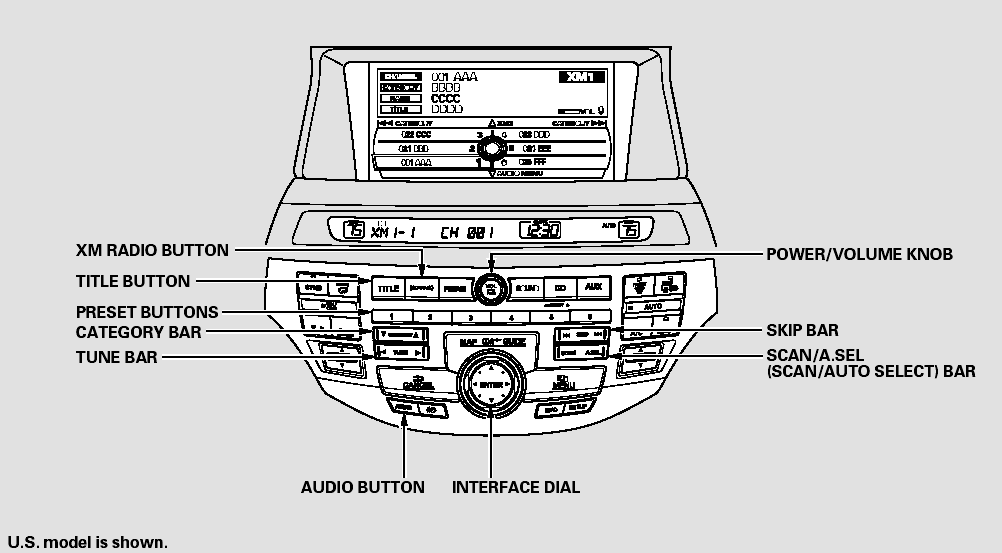
Playing the XM Radio (Models with navigation system)
Your vehicle is capable of receiving XM Radio anywhere in the United States and Canada, except Hawaii, Alaska, and Puerto Rico. XM is a registered trademark of Sirius XM Radio , Inc. and XMCANADA is a registered business name of Canadian Satellite Radio Inc.
XM Radio receives signals from two satellites to produce clear, highquality digital reception. It offers many channels in several categories.
Along with a large selection of different types of music, XM Radio also allows you to view channel and category selections in the audio display.
 Adjusting the Sound
BASS, TREBLE, FADER, and
BALANCE are each adjustable. You
can also adjust the strength of the
sound coming from the subwoofer
speaker. In addition, you can set the
speed-sensitive volume
c ...
 Operating the XM Radio
To listen to XM Radio, turn the
ignition switch to the ACCESSORY
(I) or ON (II) position, and press the
button. The last channel you
listened to will show in the audio
screen and the cent ...
See also:
Control Unit Input
Test/Replacement
1. Remove the driver's dashboard lower cover (see page 20-166).
2. Remove the screws, then disconnect the 28P connector (A) from the
HandsFreeLink control unit (B).
3. Inspect the connector an ...
Hazard Warning Switch
Test/Replacement
1. Remove these items:
• Center vent for w i t h navigation system (see page
20-178)
• Audio unit for without navigation system (see page
23-115)
2. Remove the hazard warning switch (A) ...
Rocker Arm Oil Pressure Switch B
Removal/Installation
PZEV model
1. Remove the rocker arm oil control valve (see page
11-275).
2. Remove rocker arm oil pressure switch B.
3. Install the parts in the reverse order of removal with a
new O-ring (A) ...