
 Honda Accord: Playing an iPod (Models with navigation system)
Eighth generation (2008–2012) / Honda Accord 2008-2012 Owner's Manual / Features / Playing an iPod (Models with navigation system)
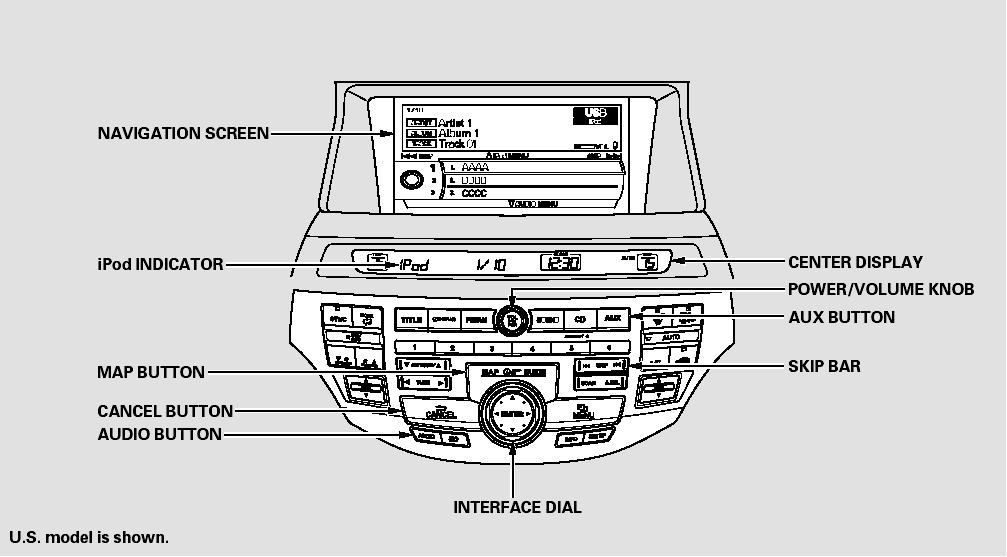
Playing an iPod (Models with navigation system)
 Disc Changer Error Messages (Models with navigation system)
The chart on the right explains the
error messages you may see in the
center display while playing a disc.
If you see an error message in the
center display while playing a disc,
press the ej ...
 To Play an iPod
This audio system can operate the
audio files on the iPod with the
same controls used for the in-dash
disc changer. To play an iPod,
connect it to the USB adapter cable
in the console compar ...
See also:
Rearview Mirror Replacement
Without Automatic Dimming Mirror
1. Turn the rearview mirror base (A) 90 В°.
2. Slide the rearview mirror base (A) down toward the
bottom of the windshield to detach it from the spring
(B) in ...
Rear Seats
• Folding Down the Rear Seat
1. Remove the center shoulder belt from the
guide.
2. Pull the release lever in the trunk to release
the lock.
3. Fold the seat-back down.
If the rear head ...
Console Accessory Power Socket
Test/Replacement
NOTE: If all of the front and console accessory power
sockets do not work, check the No. 1 8 (7.5 A) fuse in the
driver's under-dash fuse/relay box and ground (G503)
first.
1. Remove the center ...