
 Honda Accord: Information Display
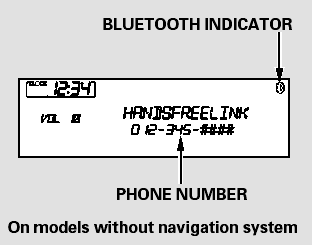
When there is an incoming call, or HFL is in use, ‘‘HANDSFREELINK’’ will appear on the display.
‘‘  ’’ indicator will be
displayed on
the audio display when a phone is
linked.
’’ indicator will be
displayed on
the audio display when a phone is
linked.
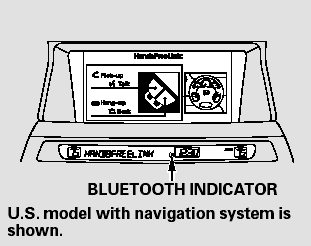
On models with navigation system
A notification that there is an incoming call, or HFL is in use, will appear on the navigation screen when the audio system is on.
 Using HFL
HFL Buttons
HFL Talk button - Press and release to give a command or answer
a call.
HFL Back button - Press and
release to end a call, go back to the
previous command, or cancel the
comman ...
 How to Use HFL
The ignition switch must be in the ACCESSORY (I) or ON (II) position.
To use HFL, you need to pair your
Bluetooth-compatible cell phone to
the system. ...
See also:
Defaulting All the Settings
Reset all the menu and customized settings as the factory defaults.
1. Press the SETTINGS button.
2. Rotate to select System
Settings, then
press .
3. Rotate to select Factory data
rese ...
Fuel Pressure Relieving
Before disconnecting fuel lines or hoses, relieve
pressure from the system by disabling the fuel pump,
running the engine until it stalls, then and disconnecting
the fuel line/quick connect fitting ...
Fasten and Position the Seat Belts
Insert the latch plate into the buckle,
then tug on the belt to make sure the
belt is securely latched. Check that
the belt is not twisted, because a
twisted belt can cause serious
injuries ...