
 Honda Accord: Defaulting All the Settings
Reset all the menu and customized settings as the factory defaults.
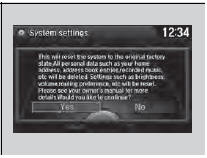
1. Press the SETTINGS button.
2. Rotate  to select System
Settings, then
press
to select System
Settings, then
press  .
.
3. Rotate  to select Factory data
reset,
then press
to select Factory data
reset,
then press  .
.
- The pop-up menu appears on the screen.
4. Rotate  to select Yes,
then press
to select Yes,
then press  .
.
- The confirmation message will appear.
5. Rotate  to select Yes,
then press
to select Yes,
then press  again to reset the settings.
- The confirmation message will appear.
Press  to select OK.
When you transfer the vehicle to a third party, reset all settings to default and delete all personal data.
The following settings will be reset:
• Routing & Guidance: Rerouting, Unverified Area
Routing, Traffic Rerouting, Edit Waypoint Search
Area, Guidance Mode, Street Name Guidance
• Route Preference

 Defaulting All the Settings
Reset all the menu and customized settings as the factory defaults.
1. Press the SETTINGS button.
1. Press and hold the DISP button.
2. Rotate to select System
Settings, then
press .
...
 Deleting all HDD Data
Reset all the menu and customized settings, and delete all music data on the
HDD.
1. Turn on the audio system and select the
HDD mode.
2. Press the SETTINGS button.
3. Rotate to select Aud ...
See also:
Passenger's Dashboard Trim
Removal/Installation
Special Tools Required
KTC Trim Tool Set SOJATP2014*
* Available through the Honda Tool and
Equipment
Program; call 888-424-6857
NOTE:
- Take care not to scratch the dashboard or the related
p ...
Power Window Master Switch
Replacement
4-door
1. Carefully remove the power window master switch
(A).
2. Disconnect the 37P connector (B) from the power
window master switch, and the 13P connector (C)
from the power mirror switch (D ...
Region Setting
The audio system’s region setting will be lost when the battery is
disconnected or
goes dead.
If the Region Select screen appears, you need to set the region for
the audio
system. Follow th ...