
 Honda Accord: Electrical Compass Unit Input
Test
Honda Accord: Electrical Compass Unit Input
Test
1. Remove the rear shelf (see page 20-128).
2. Loosen the bolts (A), then pull out the electrical compass unit bracket (B).
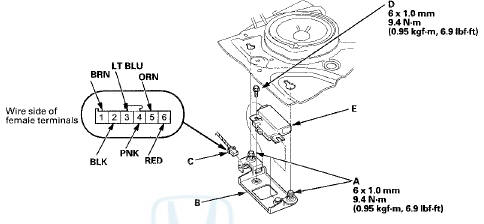
3. Disconnect the 6P connector (C) and remove the mounting bolt ( D ) , then pull out the electrical compass unit (E).
4. Inspect the connector and socket terminals to make sure they are all making good contact.
• If the terminals are bent, loose, or corroded, repair them as necessary, and recheck the system.
• If the terminals look OK, go to step 5.
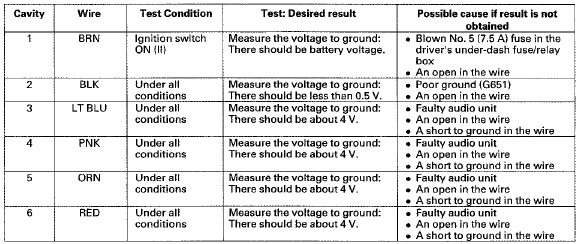
5. Reconnect the electrical compass unit BP connector. Turn the ignition switch to ON (ll), and do the following input tests at the connectors.
• If any test indicates a problem, find and correct the cause, then recheck t h e system.
• If all input t e s t s p r o v e OK, t h e electrical compass unit is faulty; replace it, and do the compass calibration (see page 23-247).
 Electrical Compass Zone Selection
and Calibration
Electrical Compass Zone Selection
and Calibration
NOTE:
• You should do this procedure any time the electrical
compass unit is replaced.
• You should do this procedure in an open area away
from buildings, power lines, and other vehicl ...

See also:
Brake/Clutch Fluid
Use the same fluid for both the brakes and clutch.
• Checking the Brake Fluid
The fluid level should be between the MIN
and MAX marks on the side of the reservoir.
NOTICE
Brake fluid marke ...
How to Refuel
1. Stop your vehicle with the service station
pump on the left side of the vehicle in the
rear.
2. Turn off the engine.
3. Push on the fuel fill door release handle at
the foot of the driv ...
Engine Number
Engine Type
K24Z2: 2.4 L DOHC i-VTEC Sequential Multiport
Fuel-injected, 177HP engine
K24Z3: 2.4 L DOHC i-VTEC Sequential Multiport
Fuel-injected, 190HP engine
Serial Number
3000001 -K24Z2 pro ...