
 Honda Accord: Playing Discs (Models without navigation system)
Eighth generation (2008–2012) / Honda Accord 2008-2012 Owner's Manual / Features / Playing Discs (Models without navigation system)
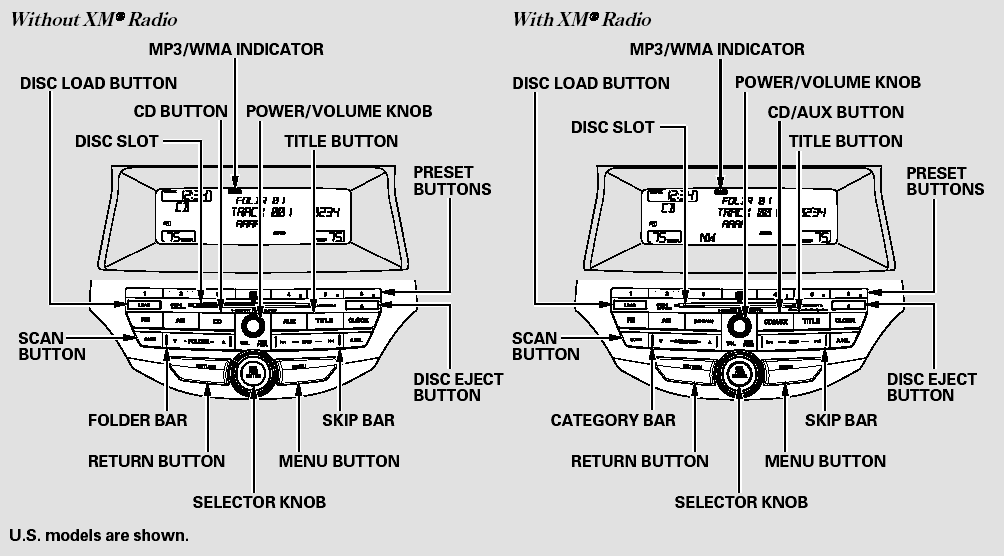
Playing Discs (Models without navigation system)
 Receiving XM Radio Service
If your XM Radio service has expired
or you purchased your vehicle from
a previous owner, you can listen to a
sampling of the broadcasts available
on XM Radio. With the ignition
switch in th ...
 To Play a Disc
To load or play discs, the ignition
switch must be in the ACCESSORY
(I) or ON (II) position.
You operate the disc changer with
the same controls used for the radio.
To select the disc changer, ...
See also:
Customized Features
Use the audio/information screen to customize certain features.
• How to customize
With the ignition switch is in ON
, press the SETTINGS
button. Rotate to
select Audio Settings, Phone Se ...
ATF Pump Inspection
1. Install the ATF pump drive gear (A), the driven gear
(B), and the ATF pump driven gear shaft (C) in the
main valve body (D). Lubricate all parts with ATF, and
install the ATF pump driven gear wi ...
Oil Pressure Test
NOTE: If the low oil pressure warning indicator stays on
with the engine running, check the engine oil level. If the
oil level is correct, do the following test.
1. With the engine stopped, remov ...