
 Honda Accord: Playing an iPod (Models with navigation system)
Eighth generation (2008–2012) / Honda Accord 2008-2012 Owner's Manual / Features / Playing an iPod (Models with navigation system)
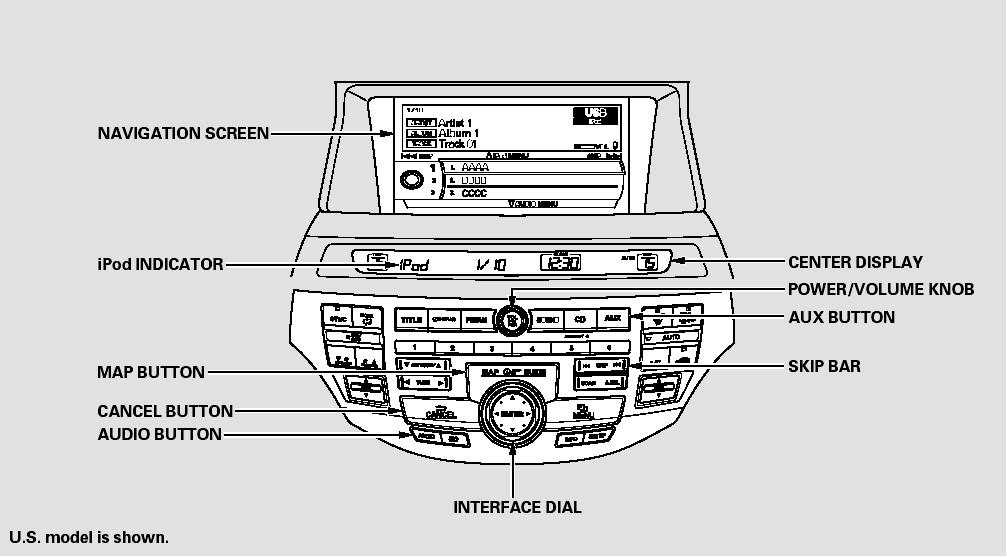
Playing an iPod (Models with navigation system)
 Disc Changer Error Messages (Models with navigation system)
The chart on the right explains the
error messages you may see in the
center display while playing a disc.
If you see an error message in the
center display while playing a disc,
press the ej ...
 To Play an iPod
This audio system can operate the
audio files on the iPod with the
same controls used for the in-dash
disc changer. To play an iPod,
connect it to the USB adapter cable
in the console compar ...
See also:
DTC Troubleshooting Index
NOTE: The above DTCs are indicated when the PGM-FI system is selected with
the HDS. Some automatic transmission DTCs cause the MIL to
come on. If the MIL is on and no DTCs are indicated in the PG ...
Adjusting the Sound
1. Press the SETTINGS button.
2. Rotate to select Audio
Settings, then
press .
3. Rotate to select Sound,
then press .
Rotate to scroll through the
following
choices:
The SVC ...
Coat Hook
To use a coat hook, pull it down.
Close it with a firm push.
Make sure the coat hook is closed
when you are not using it. This hook
is not designed for large or heavy
items. ...