
 Honda Accord: Information Display
The information display shows the odometer, trip meter, engine oil life and maintenance service item codes, and other gauges.
• Switching the Display
Press the  (Select/Reset) knob to
change the display.
(Select/Reset) knob to
change the display.
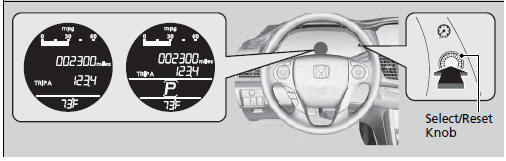
Each time you press the  knob, the information
display changes as follows:
knob, the information
display changes as follows:
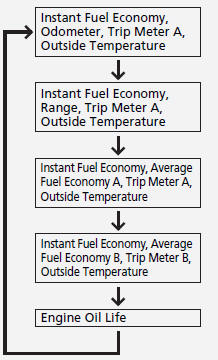
Some of the items on the information display also appear on the audio/information screen. They also change along with the information display changes while the fuel consumption is shown.
• Odometer
Shows the total number of miles (U.S.) or kilometers (Canada) that your vehicle has accumulated.
• Trip Meter
Shows the total number of miles (U.S.) or kilometers (Canada) driven since the last reset. Meters A and B can be used to measure two separate trips.
• Resetting a trip meter
To reset a trip meter, display it, then press and hold the
 knob. The trip meter is
reset to 0.0.
knob. The trip meter is
reset to 0.0.
Switch between trip meter A and trip meter B by
pressing the  knob.
knob.
• Average Fuel Economy
Shows the estimated average fuel economy of each trip meter in mpg (U.S.) or l/100 km (Canada). The display is updated at set intervals. When a trip meter is reset, the average fuel economy is also reset.
You can change when to reset the average fuel economy.
• Instant Fuel Economy
Shows the instant fuel economy as a bar graph in mpg (U.S.) or l/100 km (Canada).
• Engine Oil Life
Shows the remaining oil life and Maintenance MinderTM.
• Outside Temperature*
Shows the outside temperature in Fahrenheit (U.S.) or Celsius (Canada).
The temperature sensor is in the front bumper.
Road heat and exhaust from another vehicle can affect the temperature reading when your vehicle speed is less than 19 mph (30 km/h).
It may take several minutes for the display to be updated after the temperature reading has stabilized.
• Adjusting the outside temperature indicator
Adjust the temperature reading up to ± 5°F or ± 3°C if the temperature reading seems incorrect.
1. Turn the ignition switch to ON 
2. Press and hold the  (Select/Reset)
knob for 10 seconds or more while the
outside temperature is shown on the information display.
(Select/Reset)
knob for 10 seconds or more while the
outside temperature is shown on the information display.
uThe information display goes into temperature adjustment mode. The display
starts showing from -5°F to +5°F (U.S.) or -3°C to +3°C (Canada).
3. Release the  knob when the right
adjustment amount is shown.
knob when the right
adjustment amount is shown.
uThe adjustment is complete.
Adjust the temperature reading up to ± 5°F or ± 3°C.
• Range
Shows the estimated distance you can travel on the remaining fuel. This distance is estimated from the fuel economy of your trips in the past.
 Gauges
Gauges include the speedometer, tachometer, fuel gauge, and related
indicators.
They are displayed when the ignition switch is in ON
• Speedometer
Displays your driving speed in mph (U.S.) ...
 Multi-Information Display
The multi-information display shows the odometer, trip meter, outside
temperature
indicator, and other gauges.
It also displays important messages such as warnings and other helpful
informati ...
See also:
Fuel Pump/Fuel Gauge Sending Unit
Replacement
1. Remove the fuel tank unit (see page 11 -320).
2. Remove the fuel level sensor (fuel gauge sending
unit) (A) from the fuel tank unit (B).
3. Check these items before installing the fuel tank ...
Special Tools
* : Part of Mainshaft Inspection Tool Set, 07GAJ-PG20102.
* * : Must be used with commercially available 3/8"-16 UNF Slide Hammer. *
...
Ignition Timing Inspection
1. Connect the Honda Diagnostic System (HDS) to the
data link connector (DLC) (see step 2 on page 11-3).
2. Turn the ignition switch to ON (II).
3. Make sure the HDS communicates with the vehic ...