
 Honda Accord: Driver's Inner Dashboard Trim
Removal/Installation
Special Tools Required
KTC Trim Tool Set SOJATP2014*
*Available through the Honda Tool and Equipment Program; call 888-424-6857
NOTE: - Take care not to scratch the dashboard or the related parts.
- Use the appropriate tool from the KTC trim tool set to avoid damage when removing components.
1. Remove the driver's inner dashboard trim (A).
-1. Pry up on the edge of the trim at the steering column side with the appropriate trim tool.
-2. Detach the clips.
-3. Release the hook (B) from under the center panel (C).
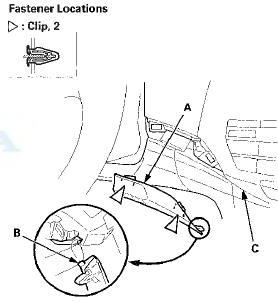
2. Install the trim in the reverse order of removal, and note these items: - If the clips are damaged or stress-whitened, replace them with new ones.
- First insert the hook under the center panel, then push the clips into place securely.
 Driver's Outer Dashboard Trim
Removal/Installation
Special Tools Required
KTC Trim Tool Set SOJATP2014*
*Available through the Honda Tool and
Equipment
Program; call 888-424-6857
NOTE:
- Take care not to scratch the dashboard or the related
pa ...
 Center Pocket Removal/Installation
Without Navigation System
NOTE;
- Take care not to scratch the dashboard or the related
parts.
- A/T is shown; M/T is similar.
1. Remove the center console panel (see page 20-157).
2. A/T: ...
See also:
Front Turn Signal/Side Marker Light Bulbs
When replacing, use the following bulbs.
1. Turn the steering wheel all the way to the
opposite side from the light being replaced.
Passenger side: Turn the steering wheel
to the left.
D ...
Changing the Set Speed
You can increase the set cruising
speed in any of these ways:
Press and hold the RES/ACCEL
button. When you reach the
desired cruising speed, release the
button.
Push on the accelerator peda ...